I accidentally deleted important files from my USB drive and realized too late they weren’t backed up anywhere else. The drive has work documents and personal photos I really need to recover, and I’m afraid using it more could overwrite the data. Looking for safe USB file recovery advice, tools, or steps that might help restore deleted files.
I learned this the hard way, so first thing first. If your USB stick is making clicking noises, dropping off and on, or getting hot in your hand, unplug it and stop there. Don’t try software fixes. Don’t run CHKDSK either. It writes changes to the drive and tries to force the file system back into shape. Sometimes your files are still sitting there fine, then CHKDSK shreds the map and leaves you with junk.
If the easy checks didn’t bring your files back, I’d assume one of two things happened. The file table is damaged, or the files were deleted for real. At that point, recovery software is the path I’d take.
You’ll see people point to free tools like PhotoRec, TestDisk, or Windows File Recovery. I’ve used them. They do work, sort of. The catch is they feel rough unless you’re comfortable in a terminal. PhotoRec in particular gave me a giant pile of renamed files with no folders, no original names, nothing useful. I ended up with stuff like f123456.jpg, f123457.jpg, and hours of manual sorting. If your drive has years of photos or work docs, that gets old fast.
What worked better for me was Disk Drill. I’m not saying it’s magic. I’m saying it was the one I could hand to a normal person and not expect a mess afterward. A few reasons I keep pointing people to it:
- It lets you image the drive first. I like this part most. You make a byte-for-byte copy of the USB stick, then scan the copy instead of hammering the original device. If the flash drive is half-dead, this matters a lot.
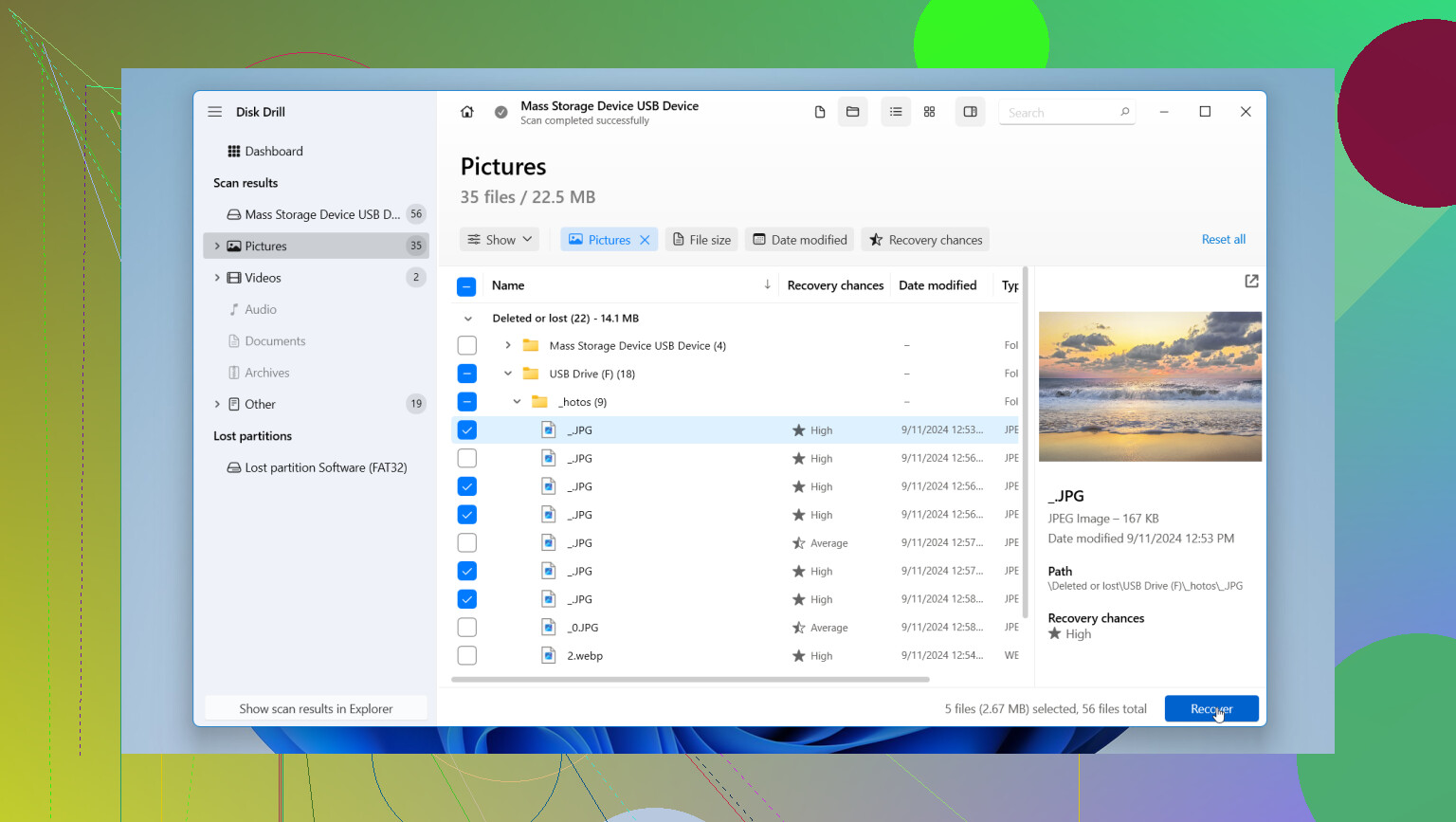
- You get previews before recovery. I could open photos, check docs, and see whether the scan found the right stuff before saving anything. Saves time. Saves guessing too.
- It keeps things organized better. Compared with the free command line tools, it did a better job keeping folder layout and identifying file types. It also works with BitLocker-encrypted drives, which helped one of my older backup sticks.
One rule people still mess up, save recovered files to your PC’s internal drive, not back onto the same USB stick. If you write recovered data onto the damaged drive, you risk overwriting the exact files you’re trying to pull out. I’ve seen people do this once, then wonder why half the recovered stuff won’t open. Yeah. That’s why.
After you’ve copied everything to your computer and checked the files open, then wipe and reformat the USB stick if you still want to test it. Me, I usually replace it. Flash drives are cheap, lost data isn’t. If you go step by step and don’t rush it, you’ve got a decent shot.
3 Likes
Stop using the USB. Every write cuts your odds.
I agree with @mikeappsreviewer on one big point, don’t run repair tools first. I’d add one more check before recovery software. Open Disk Management on Windows and see if the USB shows the right size. If capacity looks wrong, like 0 bytes or some weird number, skip home fixes. That points to hardware or controller failure.
If the drive mounts fine, your best shot is file recovery from another computer drive, not the USB itself. Disk Drill is a solid pick for deleted files from a USB drive because it handles common file systems well and gives you a fast read on what is still there. I don’t love paid tools in general, but time matters, and sorting raw output from free tools gets old fast.
Do this:
- Plug in the USB, do not copy anything to it.
- Scan it with Disk Drill.
- Preview docs and photos first.
- Recover files to your PC or an external HDD, never back to the same stick.
- Check files open before doing anything else.
For work docs, look for DOCX, XLSX, PDF. For photos, check JPG, PNG, HEIC, RAW. If names are gone, sort by file type and date. It saves a lot of time tbh.
Also, if you want a quick walkthrough, this video is decent:
watch this USB file recovery guide
If you’re comparing options, search for the best data recovery software for 2026. That query pulls up newer tests and USB-specific results. If the files are worth a lot and the stick starts disconnecting, stop and send it to a lab. That part sucks, but writing to a dying flash drive is how people lose stuff for good.

One thing I’d add to what @mikeappsreviewer and @ombrasilente said: check whether the files were actually deleted or just hidden/corrupted in the directory listing. On Windows, open Command Prompt and try attrib -h -r -s /s /d X:\*.* with X = your USB letter. Sounds dumb, but I’ve seen “deleted” files come back because malware or a bad disconnect just hid them.
Also, I slightly disagree with the “reformat after” advice as a default. If this stick ever acted flaky before, I wouldn’t trust it again at all. Retire it. USB drives are cheap, re-losing your photos is not.
If the drive is readable, scan-only is the move. Disk Drill is probly the easiest option for USB deleted file recovery since you can preview stuff before saving. Recuva can sometimes work for simple accidental deletes too, though it’s less useful once the file system gets messy.
And yeah, recover to your computer, not the same USB. People do that once and instantly regret it.
If you want more opinions, this thread is worth a read:
best ways to recover files from a faulty USB drive
Small add-on to what @ombrasilente, @himmelsjager, and @mikeappsreviewer already covered: if the USB is still readable, check the Recycle Bin on the actual PC where you deleted the files. A lot of people skip that because “it was a USB,” but Windows sometimes routes deletions there depending on how it happened.
I also wouldn’t jump straight to file carving unless the normal scan finds nothing. Carving is great for photos, but for Office docs it can leave you with broken fragments and no names. That’s one reason Disk Drill is useful here. You can start with metadata-based recovery first, then go deeper only if needed.
Disk Drill pros:
- easy preview of photos/docs
- can recover to another drive safely
- decent at keeping original structure when possible
- good for non-technical users
Disk Drill cons:
- not the cheapest option
- deep scans can take a while
- like any software, it won’t fix true hardware failure
One more thing: if the deleted files were tiny and you kept using the stick after deletion, don’t expect miracles. Flash storage wear-leveling makes recovery less predictable than old hard drives. That’s where I slightly disagree with the “just scan it and see” crowd. If the files are business-critical, a lab early on can actually be cheaper than multiple failed DIY attempts.