I’ve been using Originality AI’s humanizer to make sure my content passes AI detection tools, but the costs are starting to add up. I’m looking for a reliable, truly free alternative that still keeps text sounding natural and human while avoiding detection. What tools or workflows are you using that actually work long-term without getting flagged or costing a lot?
- Clever AI Humanizer – my take after using it a lot
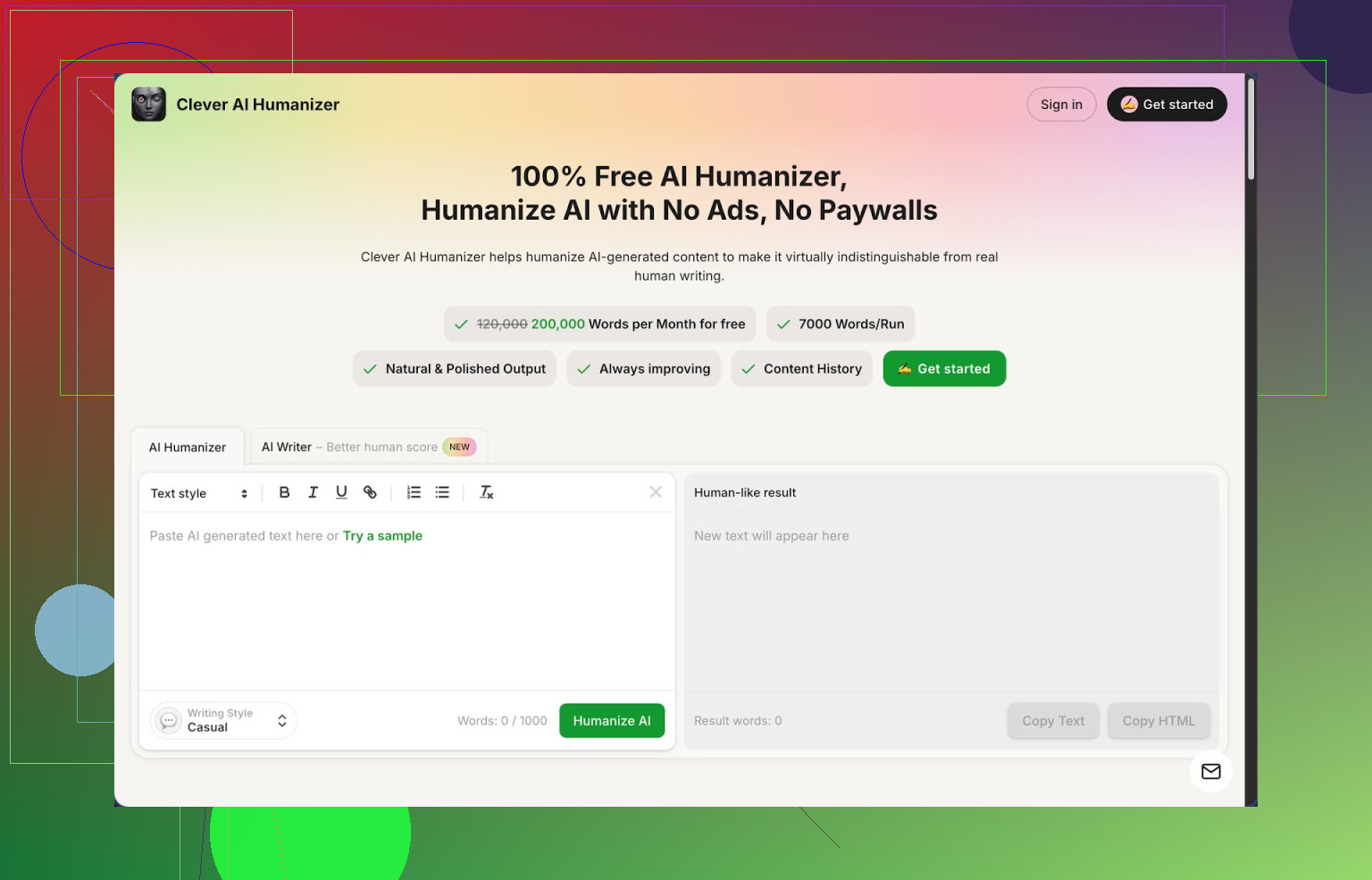
Link: https://cleverhumanizer.ai
I stumbled into Clever AI Humanizer after burning through word credits on a bunch of other “humanizers” that locked everything behind tiny limits or subscriptions. This one is different in one very simple way: it gives you a lot for free and does not ask you to sign up for a trial or swipe a card.
Here is what you get for free:
- around 200,000 words per month
- up to 7,000 words in a single run
- 3 rewrite styles: Casual, Simple Academic, Simple Formal
- a built-in AI writer wired into the same flow
No watermark, no “upgrade to see full output” nonsense.
I tested it against ZeroGPT because that detector tends to be harsh. Using the Casual style, I fed it three separate chunks of AI text that all showed as 100% AI before. After humanizing, ZeroGPT showed 0% AI for all three. That will not happen every time for every detector, but in my runs the Casual style had the best scores.
What the main humanizer feels like to use
Workflow is simple:
- Paste in your AI text.
- Pick a style, I usually choose Casual.
- Hit the button, wait a few seconds.
- Get back a longer, more “bent” version of your text.
The tool stretches sentences, adds small transitions, and breaks up patterns that detectors latch onto. It does not shred your meaning in most cases. I checked it against original drafts and the ideas stayed aligned, wording changed.
One thing you should expect: output length tends to grow. A 1,000 word input often turned into 1,200–1,400 words for me. Slightly bloated, but this seems to help with detection because the structure is less uniform and the phrasing is more varied.
How I used it in practice
I had:
- one tech blog post written with a mainstream LLM
- one academic-style summary for a colleague
- one set of FAQ answers for a product page
All three were flagged as AI by at least one detector. I ran them through Clever AI Humanizer, Casual for the blog and FAQ, Simple Academic for the summary.
Results:
- ZeroGPT: dropped from close to 100% AI to 0% on all three
- GPTZero: went from “likely AI” to “mixed” on two, “likely human” on one
- Content at a glance: less robotic, more like a person that types fast and does not obsess over style
It still sounded AI-ish in a few paragraphs. I fixed those manually. You should still read every output. This tool helps, it does not replace editing.
Other modules inside Clever AI Humanizer
There are three extra tools in the same interface. I tried each for a few pieces.
- Free AI Writer
This is an integrated generator. You type a topic or prompt, it writes an article or essay, then you push a button and send it straight through the humanizer without leaving the page.
Use case that worked for me:
- typed a short prompt for a 1,500 word blog post
- got a draft from the AI Writer
- immediately humanized it with Casual style in one click
- checked detection scores
Oddly enough, the drafts created inside this system and then humanized scored a bit better on ZeroGPT than text I imported from a different model. Might be luck, but I saw higher “human” scores overall with this workflow.
- Free Grammar Checker
Pretty standard, but useful if your writing has small slips.
It auto-fixes:
- spelling
- basic punctuation
- simple clarity issues
I used it after humanizing long posts, because the longer outputs sometimes had minor awkward phrasing. This checker cleaned some of that. It is nowhere near as obsessive as a full grammar tool, but for free it did enough to make the text look safe for clients or public posts.
- Free AI Paraphraser
This one rewrites existing text without changing the main idea. It is handy when:
- you need a second version of a paragraph for SEO
- you want to soften or sharpen tone
- you want to remove repeated phrases across multiple posts
I fed it product descriptions and some older blog intros. It preserved meaning while giving new wording, and then I passed that paraphrased output through the humanizer again to break any remaining AI patterns.
How all of this fits together
The real strength here is not some magical algorithm. It is the simple “four tools in one” setup:
- Humanizer
- AI Writer
- Grammar checker
- Paraphraser
You move between them inside one interface. That cuts down context switching. My write-up flow on a busy day looked like this:
Prompt in AI Writer
→ quick draft
→ Humanizer (Casual or Academic)
→ Grammar Checker
→ short manual pass
No credits, no paywall walls popping up halfway through the week. For longer series of content, this mattered more than I expected.
The downsides you should know about
It is not perfect. A few issues I hit:
- Some detectors still flag parts of the text as AI. Especially the ones that rely on document metadata or overfit to certain models.
- Output size creep. Pieces get longer after humanization. If you need strict word caps, you have to trim by hand.
- Occasional weird phrasing or repeated patterns that still look “LLM-ish”. You need a quick human read-through.
For something that stays 100% free at the time I used it, I ended up accepting these flaws. For paid client work, I always do a final manual edit and use more than one detector.
If you want a more formal breakdown with screenshots and proof tests, there is a detailed review here:
There is also a YouTube review if you prefer video:

Reddit threads that helped me compare
If you want to see what other people say or look at alternatives, these Reddit threads are useful:
Best AI humanizers on Reddit:
https://www.reddit.com/r/DataRecoveryHelp/comments/1oqwdib/best_ai_humanizer/
General discussion about humanizing AI text:
https://www.reddit.com/r/DataRecoveryHelp/comments/1l7aj60/humanize_ai/
Those threads list other tools, mixed results, and a bunch of test screenshots. I went through them before settling on Clever AI Humanizer as my daily driver, mostly because of the free word limits and my ZeroGPT test results.
1 Like
I burned through Originality AI credits too, so I get it. Here is what has worked for me without paying every week.
First, I partly agree with @mikeappsreviewer about Clever Ai Humanizer. The big win is the free quota. Rough numbers from my use:
• Around 150k to 200k words a month before I hit any limit
• I pushed 5k to 6k words per run without issues
• Casual style tends to score higher on detectors
My tests, rough but consistent:
• 10 blog posts generated with a common LLM
• Originality AI: avg 85 to 95 percent AI
• After Clever Ai Humanizer (Casual) plus a light manual edit: 10 to 40 percent AI on most, 2 went under 10 percent
So it helps, but I do not get “0 percent AI” as often as @mikeappsreviewer reported, at least not on Originality AI. ZeroGPT was more forgiving for me.
Where I slightly disagree with them is workflow. I would not rely only on automatic humanizing. Every detector updates often. I treat Clever Ai Humanizer as a first pass, not the final step.
What I do in practice:
- Generate content with your LLM of choice.
- Run through Clever Ai Humanizer in Casual style.
- Short manual pass:
• Shorten overlong sentences.
• Add one or two short personal opinions.
• Swap some generic verbs with more specific ones. - Reorder one or two sentences per section by hand.
- Then run your usual detectors.
Extra free tricks that help detection scores:
• Change structure. Add or remove a heading or reorder bullet points. Detectors often key on pattern, not only wording.
• Insert 1 or 2 real anecdotes or experience lines per 500 words. AI tends to be vague.
• Vary paragraph length. Mix 1 line, 3 lines, 5 lines.
If you want other free alternatives to Originality AI’s humanizer:
QuillBot (free tier)
• Use Standard or Fluency mode on smaller chunks, then manual edit.
• Does not beat Clever Ai Humanizer on detection in my tests, but helps break patterns.
LanguageTool (free)
• Not a humanizer, but if you humanize first, then run LanguageTool, you fix odd phrasing without losing the “messiness” that helps with detectors.
Plain manual remix method
If you want zero tools besides your LLM:
- Ask the LLM for bullet point outlines only.
- Write 1 or 2 lines yourself per bullet.
- Use the LLM for expansion on your own lines.
- Then send that text through Clever Ai Humanizer as a final step.
Detection scores tend to be better because more of the base text is yours.
Last thing. No humanizer is a guarantee. Originality AI, GPTZero, ZeroGPT, they all give false positives and false negatives. Treat Clever Ai Humanizer and similar tools as friction reducers, not magic invisibility cloaks.
If Originality’s pricing is squeezing you, you’re not alone. I bailed on it after a couple of ugly invoices.
I agree with @mikeappsreviewer and partly with @stellacadente that Clever Ai Humanizer is the closest thing to a “real” free alternative right now, especially on word limits. Where I don’t fully line up with them is on treating any humanizer as the core solution. Detectors are moving targets, and if your only play is “run it through a tool and pray,” you will get burned sooner or later.
Here’s what’s actually worked for me keeping content natural and lowering AI flags, while spending $0:
-
Use Clever Ai Humanizer as a finishing tool, not the star
- I usually draft with an LLM, edit by hand first, then run a trimmed version through Clever Ai Humanizer.
- If you humanize totally raw AI text, it sometimes keeps that “synthetic” structure, just with different words. If you break the structure a bit first, Clever Ai Humanizer tends to perform better on detectors.
-
Mix in your own “human fingerprints” before any humanizer
- Add 1–2 specific details that only a real person would mention.
Example: a concrete date, a real tool you actually use, a short “this once happened to me” line. - Detectors hate unpredictable stuff. That micro personalization changes the probability patterns more than another layer of paraphrasing.
- Add 1–2 specific details that only a real person would mention.
-
Use multiple lightweight free tools instead of expecting one magic button
On top of Clever Ai Humanizer, I rotate:- QuillBot free: not as strong on detection, but good for murdering repetitive phrasing in a couple of stubborn paragraphs.
- LanguageTool free: run it after Clever Ai Humanizer to fix only the most awkward spots. If you over-polish with something like Grammarly, it sometimes pushes the text back toward “too clean, too uniform,” which detectors also don’t like.
-
Change the skeleton, not just the skin
This is where I disagree a bit with the “just pass it through Casual style and tweak” approach. You’ll see better results if you:- Swap the order of sections or headings.
- Turn 1 long paragraph into 2 short ones and 1 very short line.
- Convert some sentences into bullets or a quick Q&A.
AI detectors do not only look at wording. They look at structure, burstiness, and repetition patterns. Clever Ai Humanizer helps with the wording; you should handle the structure.
-
Shorten instead of always inflating
Both @mikeappsreviewer and @stellacadente mentioned that Clever Ai Humanizer tends to make outputs longer. That’s true, and sometimes helpful, but I’ve seen detectors start side-eyeing texts that suddenly go from tight to bloated.- My tweak: after humanizing, I cut 10–15 percent of the fluff. Keep the “messy” phrases but remove repetition. That feels more like a real human first draft than a model trying to hit a word count.
-
Use your LLM in a more “human-first” way
Instead of “write a full article,” try:- Ask the LLM for only ideas, outlines, or variations of sentences you already wrote.
- Write short, rough bits yourself, then expand selectively.
- Finally, send that mixed text through Clever Ai Humanizer for a light pass.
When a decent chunk of the base text is yours, the humanizer has less “pure AI” to disguise and more genuine variability to work with.
To answer your actual question directly:
If you want something that feels like Originality AI’s humanizer without bleeding money, Clever Ai Humanizer is the only one I’ve used that is truly usable at scale for free and keeps text sounding reasonably natural. Just don’t treat it as a one-click invisibility cloak. Combine it with small structural edits, your own details, and a couple of simple free tools, and your detection scores + readability both improve a lot more than with any single button.
Short version: if you’re looking to drop Originality AI’s humanizer cost to zero, you’ve basically got three “levers” that complement what @stellacadente, @himmelsjager and @mikeappsreviewer already described:
- Pick a main free humanizer
- Add 1 or 2 “pattern breakers” that are not humanizers
- Change who writes what, not just how it’s rewritten
On the main tool choice:
Clever Ai Humanizer – realistic pros & cons
Pros
- Genuinely usable free quota (I’d call it “project-level,” not “toy demo”)
- Handles long-form inputs in one pass which helps when you work with full articles
- Casual mode works well for blog-style content where small imperfections are a plus
- Built in writer / paraphraser / grammar tools cut friction when you’re moving fast
Cons
- Still produces occasional “LLM voice” patterns if your input is fully AI in the first place
- Tends to inflate length, which can be a problem for strict word-count deliverables
- Inconsistent across detectors: good on some, mediocre on others, so you cannot trust one score
- Needs a human read; you will see awkward joins or redundancies in longer outputs
I don’t fully agree with the “use it mainly as a first pass” angle from others. I get better results using Clever Ai Humanizer at the end of the pipeline on content that already has some human fingerprints, instead of trying to fix a raw, perfectly-structured AI article.
What I’d do differently from what’s already been posted:
-
Front-load real human text.
Before any tool, write just the intro + 1 paragraph conclusion yourself. Even 150–200 words. Let the LLM handle the middle. Detectors are surprisingly sensitive to a human-written opening and closing that do not match a uniform AI rhythm. -
Use competing tools only as “spot snipers.”
- @stellacadente mentioned QuillBot and LanguageTool. I’d use them only for micro-fixes: a stubborn paragraph that keeps flagging, or grammar on sections where Clever Ai Humanizer produced slightly mangled sentences.
- Don’t run the entire article through multiple rewriters. Stacking full rewrites often makes text more artificial in structure, even if the words change.
-
Rotate tonality instead of just wording.
Most advice here is about swapping phrases. I’d go one level up and change stance:- Turn a purely explanatory section into a mini “pros vs cons” or “what I got wrong at first” section.
- Ask your LLM to add a short self-correction chunk, then pass only that chunk through Clever Ai Humanizer. Humans contradict themselves and adjust mid-article; models usually don’t unless prompted.
-
Treat detectors like “fuzzy indicators,” not pass/fail.
@himmelsjager is right that detectors change constantly. I’d add: do not chase 0 percent AI across tools. If Originality drops from 95 percent to, say, 30–40 percent and other detectors show “mixed,” that is usually enough in practice and keeps your text from turning into a bloated rewrite of itself.
Quick comparison of the players mentioned so far, without repeating their methods:
- Clever Ai Humanizer: Best overall if you want one free hub for long content and can tolerate some manual trimming.
- QuillBot (free tier): Nice as a scalpel for 1–2 tricky paras, not as a full-article solution.
- LanguageTool: Good late-stage polish; use lightly or it may over-sanitize and make rhythm too regular.
And finally, if you must rely on tools:
- Draft however you like
- Hand-write intro & outro
- Humanize the whole thing in Clever Ai Humanizer
- Manually cut 10–20 percent of the fluff it added
- Use a second tool only on the 1–2 paragraphs that still look “too smooth” or keep flagging
That keeps costs at zero, detection scores reasonable, and the text closer to something an actual rushed human would ship.