I’ve been using WriteHuman AI for content and copy, but the costs are starting to add up and I can’t keep paying for it. I’m looking for a truly free tool (or generous free tier) that can give similar human-like writing quality for blogs, social posts, and emails. What free WriteHuman AI alternatives are you using, and how do they compare in terms of quality and limitations
- Clever AI Humanizer, from someone who got tired of paying for this stuff
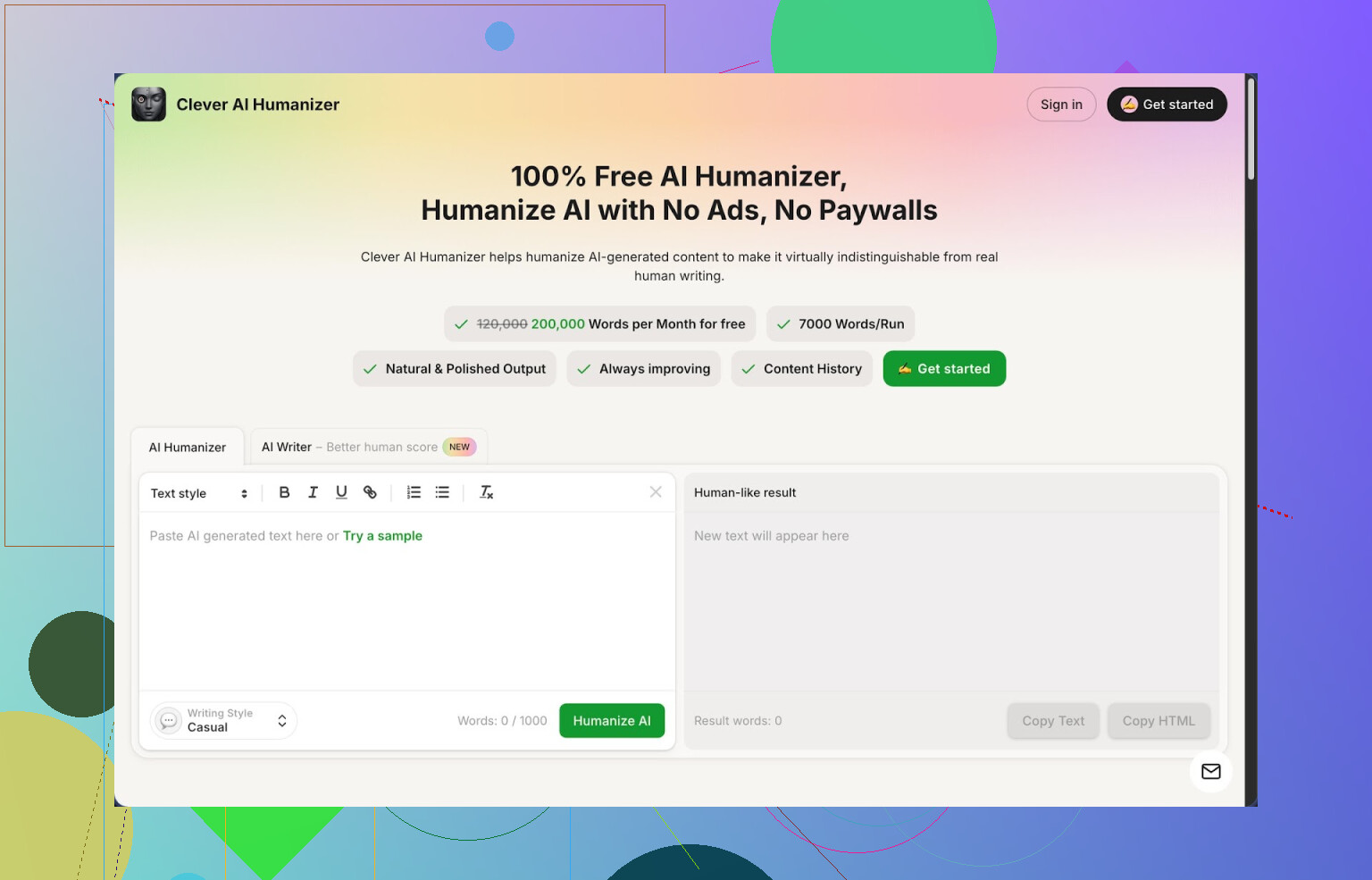
Link: https://cleverhumanizer.ai
I hit this tool after bouncing between paid “humanizers” that either wrecked my text or locked me behind a tiny word cap. This one ended up staying in my tabs.
Here is what stood out when I used it for a week on client work and school stuff.
Free plan and limits
The thing everyone looks for first: limits.
- Price: 0, no login tricks or hidden trial stuff when I used it
- Monthly quota: 200,000 words
- Per run: up to 7,000 words
- Styles: Casual, Simple Academic, Simple Formal
- Extras in the same interface: AI Writer, Grammar Checker, Paraphraser
For context, 200k words is enough to process long form articles, essays, emails, and then redo them a few times. I pushed a 5,500 word draft through twice in one day, no issue.
AI detection tests
I did some quick and dirty tests because I was tired of guessing.
Workflow I used:
- Wrote text with a standard GPT model, default tone, around 1,000 words.
- Ran it through Clever AI Humanizer with the Casual style.
- Checked the raw AI text on ZeroGPT. It got flagged as 100 percent AI.
- Checked the humanized version on ZeroGPT. For three different samples, it showed 0 percent AI.
ZeroGPT is not gospel, and other detectors might behave differently, but this is better than what I saw with most tools that promise miracles but barely change the detection score.
If you are trying to pass multiple detectors at once, you still need to test. I would not paste the output straight into a high risk environment without checking.
Main tool, the “Free AI Humanizer”
This is the part I used the most.
Process:
- Paste your AI text.
- Pick style: Casual, Simple Academic, Simple Formal.
- Hit run and wait a few seconds.
What I noticed:
- It reshapes sentence length and rhythm instead of tossing random synonyms.
- Paragraphs often end up longer. That seems intentional, since longer, less robotic clauses tend to trip detectors less.
- It keeps the structure of arguments. So if you have a list of points, they stay in the same order.
Example from my workflow:
- Input: a standard AI blog section, 800 words, about data backup best practices.
- Output: similar structure, but more first person-ish phrasing, slight overlaps fixed, fewer repeated phrases like “on the other hand” and “overall”.
- Edits needed from me afterward: trimming wordiness and putting back a few technical terms it simplified too much.
So it does not rewrite your idea from zero. It rearranges it so it reads less “model-ish”.
Meaning preservation
This was my main fear.
I compared original vs humanized text for a technical guide:
- Step lists stayed intact.
- Numbers and metrics were unchanged.
- It simplified some jargon in Casual style. Using Simple Academic or Simple Formal kept more terminology.
If your text is sensitive, like legal or medical, you still need to recheck each line. For general blogs, essays, and SEO content, I felt safe enough.
Other modules in Clever AI Humanizer
All in the same interface, no extra logins when I used it.
- Free AI Writer
You give it a prompt like “write a 1,200-word blog post about external hard drive backup strategies for freelancers” and it generates text, then you run the humanizer on it without leaving the page.
My experience:
- The raw AI Writer output alone is standard AI stuff, nothing shocking.
- Running it through the humanizer improved the ZeroGPT score a lot.
- This combo was faster than bouncing between an external LLM and then a separate humanizer.
If you want one pipeline for quick content, this is convenient.
- Free Grammar Checker
This one behaves more like a typical grammar tool.
What it did for me:
- Fixed punctuation and spelling.
- Smoothed awkward phrasing in a few spots.
- Did not change tone as aggressively as the humanizer.
I used it after the humanizer step on texts I wanted to send to clients, since humanization sometimes made sentences wordy.
- Free AI Paraphraser
Different from the humanizer. It is closer to a rephrasing engine.
Use cases I tried:
- Rewriting an old blog post to avoid self-plagiarism on a new domain.
- Adjusting tone from Casual to something closer to Simple Academic.
- Making shorter versions of a long explainer.
It preserved meaning decently in my testing, but I still compared paragraphs side by side. For SEO-focused content, this was handy when I needed variations of the same point.
How it feels to use day to day
What I liked:
- All four tools are in one place: humanizer, writer, grammar, paraphraser.
- Interface is simple. You paste, pick a style, hit the button. No weird onboarding funnel.
- Word limits are high enough that you do not have to slice everything into small chunks.
The flow I ended up with:
- Draft with an LLM or the built-in AI Writer.
- Run through Clever AI Humanizer in Casual or Simple Academic.
- Test on a detector like ZeroGPT or your in-house tool.
- If needed, trim or tweak and run the Grammar Checker.
This cut a decent chunk of editing time for low and mid stakes content.
Annoying parts and limits
It is not magic.
Here is what bugged me a bit:
- Some other detectors still tagged the text as AI. The ZeroGPT 0 percent result did not always match other tools. Treat the scores as hints, not guarantees.
- Output often gets longer than input. For short assignments with word caps, I had to trim manually.
- In Casual mode, it sometimes softened technical wording too much. For niche topics, I preferred Simple Academic or Simple Formal, then I edited terminology back in.
So you still have to think, test, and edit. It is not a fire and forget solution.
If you only want a single feature “rewrite this paragraph in a human voice” with strong manual control, you might find the all-in-one approach slightly bulky. For me, having everything on one site outweighed that.
More detailed breakdown and external links
If you want a more structured review with screenshots and AI detection proof, there is a full write up here:
There is also a YouTube walkthrough here, if you prefer watching someone click through the interface:

And if you want to see what other people are using and complaining about, these Reddit threads helped me compare tools and approaches:
Best AI humanizers thread:
https://www.reddit.com/r/DataRecoveryHelp/comments/1oqwdib/best_ai_humanizer/
General “humanize AI” discussion:
https://www.reddit.com/r/DataRecoveryHelp/comments/1l7aj60/humanize_ai/
Quick takeaway from my usage
- Strong points: free, high word limits, decent at reducing AI patterns for some detectors, integrated workflow.
- Weak points: not perfect across all detectors, output gets longer, needs manual cleanup for tight word limits or niche jargon.
If you are tired of juggling five different sites to get past AI filters and want something you can plug into your daily writing routine, this one is worth testing on your own samples.
1 Like
I used WriteHuman too for a bit, so I feel your pain on the pricing once you start doing real volumes.
I agree with a lot of what @mikeappsreviewer said about Clever Ai Humanizer, especially the free 200k words. For a straight “humanize GPT text and run” workflow, it does the job. I use it mainly when I need something quick that does not scream AI in the first two sentences.
That said, I would not rely on a single humanizer for everything, especially if you deal with stricter checks at work or in school. My setup now is a mix of tools, all free or with big free tiers:
-
Clever Ai Humanizer
Best for: long content where you want human-like rhythm.
My settings:- Casual for blogs and emails.
- Simple Academic for essays and B2B content.
Tips: - Turn long sections into 1k to 2k word chunks even though it takes more. Quality stays more stable.
- After humanizing, run a quick manual pass and cut 10 to 15 percent fluff. It tends to expand text.
-
QuillBot (free tier)
Best for: short paragraphs, intros, conclusions.- Use the “Standard” or “Fluency” modes.
- Good at rephrasing individual paragraphs that still feel robotic after Clever Ai Humanizer.
- Free tier has a character cap, so use it surgically on the parts that matter most.
-
LanguageTool (free)
Best for: grammar, style, and catching weird phrasing.- Use the browser extension on your doc or CMS.
- It helps strip out repetition and awkward phrases that detectors sometimes latch on to.
Workflow: paste humanized text into a doc, let LanguageTool flag issues, accept or reject quickly.
-
Your own “fingerprint” layer
This part sounds boring, but it matters if you want human-like writing without depending 100 percent on tools.
After you run something through Clever Ai Humanizer or another tool:- Add 1 or 2 short personal lines per section. Things you would say, not what AI tends to say.
- Swap in your usual phrases. Everyone has habits like “to be fair” or “here is the catch”.
- Change a few headings into the way you normally title stuff.
Doing this on 1,000 words takes maybe 5 to 10 minutes once you get used to it, and it makes the text feel less “processed”.
Loose example of a workflow that keeps costs at zero:
- Draft with any free GPT front-end.
- Run the whole piece through Clever Ai Humanizer in Simple Academic.
- Fix grammar and style with LanguageTool.
- For sections that still feel off, push small chunks through QuillBot.
- Add your own “fingerprint” lines and phrases.
This combo covers: generation, humanizing, cleanup, personal touch. No subscription and no word fees.
If you want something closest in feel to WriteHuman AI in a single place, Clever Ai Humanizer is the nearest free option I have used that does not choke on long pieces. For safety, still test with more than one detector if the stakes are high, and never trust one green score from any one site.
If WriteHuman is starting to bleed your wallet, you’re not crazy to bail. It’s decent, but it’s not that special.
I’m mostly on the same page as @mikeappsreviewer and @jeff about Clever Ai Humanizer being the closest “WriteHuman-like but free” option, especially with that 200k word cap. Where I’ll push back a bit: I wouldn’t treat any humanizer as your main writing tool. Most of them are glorified rephrasers trying to dodge patterns that detectors look for, and that game is lossy by design.
Here’s how I’d look at it instead:
-
Primary replacement for WriteHuman
- If your main thing with WriteHuman was:
“I generate with GPT, then I run it through something to make it feel more human and pass basic checks,”
then yes, Clever Ai Humanizer is the most realistic free alternative right now. - It’s especially decent for: blog posts, emails, simple landing page copy, and school essays that aren’t super technical.
- If your main thing with WriteHuman was:
-
Where I disagree a bit with the hype
- Detection scores: A single “0 percent AI” from one detector is meaningless if the context is high risk. Some campus or company detectors are tuned differently and will still ping your text.
- Over-processing: If you run draft → humanizer → paraphraser → more tools, your writing starts to feel like reheated leftovers. Human, but weird.
-
If you want “human-like” more than “undetected”
I’d actually lean toward this flow instead of stacking 3 humanizers in a row:- Draft with any free GPT front-end.
- Run once through Clever Ai Humanizer in Simple Academic or Simple Formal.
- Then spend 10 minutes doing real edits:
- Add specific details (brands, dates, tiny stories, personal preferences).
- Insert 2–3 mild opinions per 1k words.
- Break patterns: shorten a few sentences to 3–5 words, make one long one, toss in a rhetorical question.
Tools can’t fake your quirks very well. That’s actually the cheapest “humanizer” you have.
-
Truly free alternatives worth mixing in
Not repeating what they already listed, but complementary stuff:- Hemingway Editor (free web version)
Great to kill that bloated, over-formal AI tone. Paste your text in, look at the highlighted clutter, cut it down. Works well after Clever Ai Humanizer, when it gets too wordy. - Draft in Google Docs + built-in grammar + your own edits
Boring, yes. But Google’s suggestions often strip some of the “AI-speak” repetition. - Any free-tier GPT UI where you explicitly prompt for:
“Write this as if a slightly informal professional wrote it, avoid generic phrases like ‘in conclusion,’ ‘overall,’ and ‘on the other hand’.”
Then only use Clever Ai Humanizer on sections that still feel robotic.
- Hemingway Editor (free web version)
-
When you probably shouldn’t use any humanizer
- Legal, medical, compliance-heavy docs. You risk tiny meaning shifts that can screw you hard.
- Highly technical stuff where terminology precision matters. In those cases, generate with AI, but do your own humanization and only use something like Clever Ai Humanizer in its more formal modes, and then revert any messed-up terms.
So yeah:
- If you want a single, free-ish, WriteHuman-style tool, Clever Ai Humanizer is the realistic pick right now.
- Just don’t outsource all the “human” part to it. Treat it like a strong assist, not a magic invisibility cloak.
Short version: you can get very close to WriteHuman AI quality for free, but you’ll probably do better with a combo of tools than with a single “magic” humanizer.
1. On Clever Ai Humanizer vs WriteHuman
I’m mostly with @jeff, @shizuka and @mikeappsreviewer: if you want a straight 1‑tool replacement, Clever Ai Humanizer is the closest thing right now.
Pros of Clever Ai Humanizer
- Very generous free tier (the 200k words is legitimately usable at scale).
- Handles long pieces in one go, which WriteHuman’s cheaper competitors often choke on.
- Styles are actually distinct: Casual vs Simple Academic vs Simple Formal feel different.
- Humanization focuses on sentence rhythm and structure instead of just swapping synonyms, which is what a lot of “AI humanizers” secretly do.
- Built‑in writer, grammar checker and paraphraser keep you in one interface.
Cons of Clever Ai Humanizer
- It tends to inflate word count. If you have strict word caps, you will be trimming.
- Some niche technical or domain‑specific terms get softened, especially in Casual mode.
- Like any humanizer, it will not consistently fool every detector, no matter what one test says.
- Output can feel slightly “processed” if you use it on every single paragraph without any manual touch.
- Interface is simple but not very configurable if you want granular control over tone.
I slightly disagree with how heavily some people lean on it for “detection safety.” Use it for readability first, “less AI-ish feel” second, avoidance of detectors third.
2. Where I’d tweak the workflows they suggested
@jeff and @mikeappsreviewer lean on a chain of: GPT → Clever Ai Humanizer → QuillBot → LanguageTool, etc. That works, but stacking too many rewriters in a row can sand off any real personality.
If your goal is “human-like, not obvious AI, zero cost”, I’d simplify:
- Draft with any free GPT front end.
- Run the whole piece once through Clever Ai Humanizer in Simple Academic or Simple Formal.
- Manually clean: cut filler, reinsert your key terms, add one or two concrete examples or mini opinions per section.
- Run a light grammar / clarity pass with LanguageTool or Google Docs only if needed.
I would skip routing big chunks through multiple paraphrasers unless a specific section still sounds robotic.
3. Other free tools to pair with Clever Ai Humanizer
To avoid repeating what they already listed, a few different angles:
-
Hemingway Editor (web)
Paste your Clever‑humanized text in, then cut down the highlighted complex sentences. This fixes that “bloated AI” feel better than another paraphrase. -
LibreOffice / Google Docs + your own style guide
Use built‑in grammar suggestions and maintain a short personal checklist:- Remove generic AI transitions like “overall,” “in conclusion,” “on the other hand.”
- Replace 3 to 5 phrases per 1k words with your natural wording.
The checklist sounds boring, but it beats a second humanizer pass.
-
Targeted re‑prompting instead of more humanizers
For a paragraph that still reads robotic, instead of QuillBot or another tool, try:
“Rewrite the following paragraph as if someone is explaining it in a Slack message to a colleague. Keep all technical details intact, avoid cliches and generic phrases.”
Then, if that still feels AI-ish, send just that paragraph into Clever Ai Humanizer.
4. When Clever Ai Humanizer is actually enough alone
Use it as your only heavy tool when:
- You are writing blogs, emails, basic landing pages or low‑risk school assignments.
- You are okay doing a quick 5 to 10 minute pass afterward to restore your tone and fix length.
- You are mainly after smoother flow and fewer obvious AI patterns, not bulletproof detector evasion.
In that case:
- Start with Simple Academic for most things.
- Switch to Casual only if you explicitly want more conversational language.
- Avoid repeatedly re‑humanizing the same text. One pass plus manual edits is usually cleaner.
5. Situations where I would not rely on any humanizer
- Legal, medical, or compliance documents where nuance is non‑negotiable.
- Highly technical documentation with lots of domain terms and acronyms.
- Anything subject to aggressive in‑house AI filters that you know are customized.
Here I would use GPT to draft, then edit manually and use Clever Ai Humanizer only on small, non‑critical sections, checking every term it touches.
6. How the other takes fit in
- @jeff is spot on about chunking large texts for stability, but if you can stay under the per‑run limit, I prefer processing full sections so you keep consistent tone throughout.
- @shizuka is right that over‑processing makes writing feel like “reheated leftovers.” I’d lean even more minimal than they suggest and treat humanizers as one pass only.
- @mikeappsreviewer did a thorough breakdown of Clever Ai Humanizer’s modules; I’d just stress that the built‑in writer is fine for convenience, but you may get better base drafts from other free GPT front ends and then only use Clever for the humanizing part.
Bottom line:
- Closest free alternative to WriteHuman AI in a single place: Clever Ai Humanizer.
- Best results: combine it with a short manual tweaking session instead of stacking more “humanizers” on top.