I’ve been using Decopy AI’s humanizer to make AI-generated text sound more natural, but the costs are starting to add up. I’m looking for a genuinely free or low-cost competitor that offers similar quality without heavy usage limits. What tools or platforms are you using that reliably humanize AI content and still pass detection checks?
- Clever AI Humanizer – my long, slightly messy review
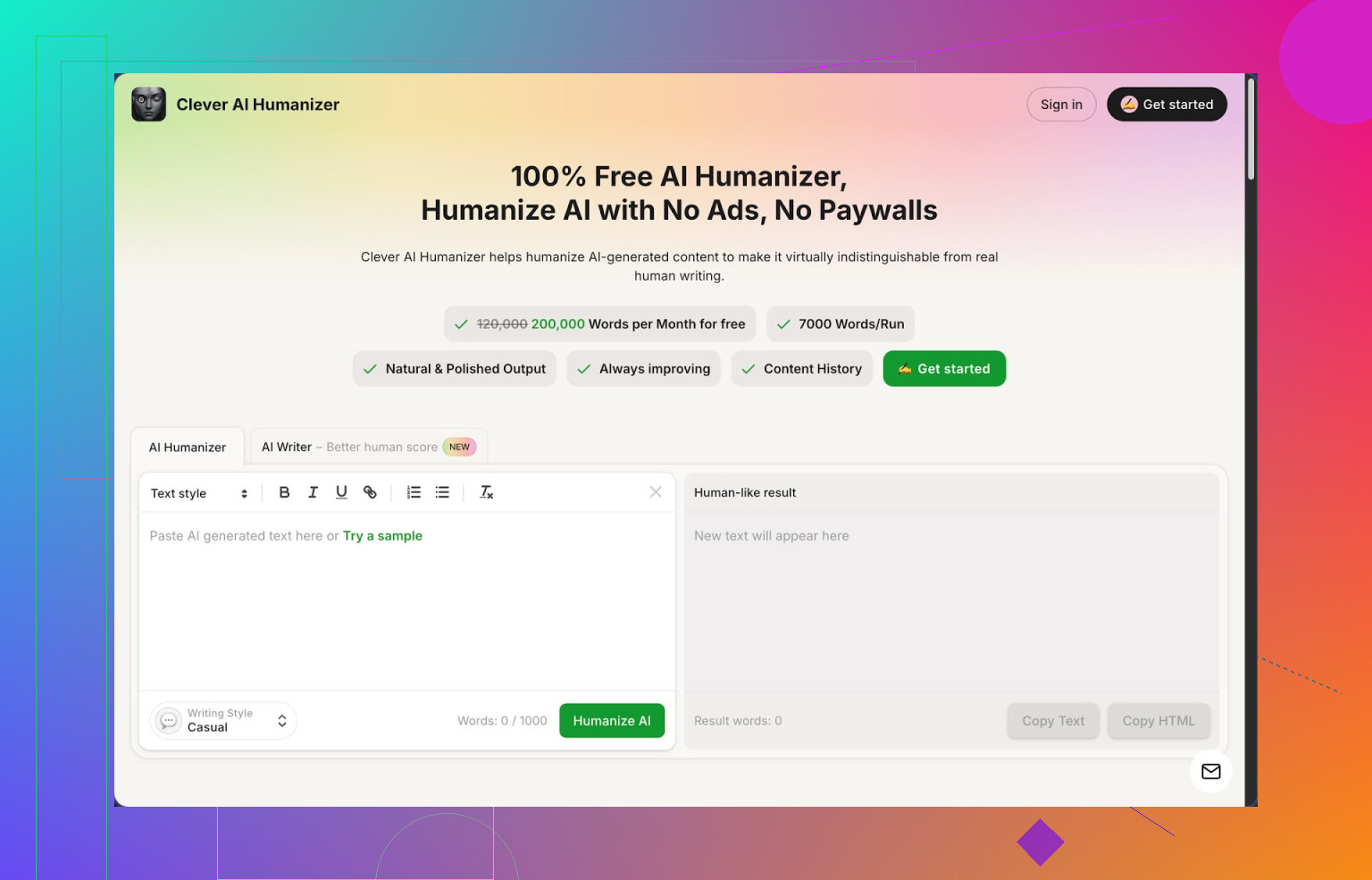
Link: https://cleverhumanizer.ai
I tripped over Clever AI Humanizer after getting sick of paying for word credits on every other “humanizer” site. This one is free. Not fake-free with 200 words, but an actual monthly allowance that feels usable: around 200,000 words a month, and roughly 7,000 words per run. It also has three styles, Casual, Simple Academic, and Simple Formal, plus an AI writer built in.
I spent an afternoon feeding it stuff from different models and checking the output on detectors. The odd part, it hit 0% AI on ZeroGPT with the Casual mode for three different samples. That surprised me, because I had already tried a few paid tools that still hit 40 to 80 percent AI on the same text.
I am not saying it will fool every tool every time. It did well with ZeroGPT for me, and that is it.
What the main humanizer does
The main module is the “Free AI Humanizer” screen. I ended up using that the most.
My process looked like this:
- Paste AI output
- Pick style: Casual, Simple Academic, or Simple Formal
- Hit run and wait a few seconds
- Copy result, test on detector, adjust if needed
The Casual style sounded closer to how I write, so I stuck with that. Simple Academic felt okay for essays or assignments, and Simple Formal sat somewhere in between.
Two details that helped:
• It handles big chunks. I pushed it near the 7k word limit and it still processed it in one go, which saves time.
• It did not wreck the meaning of my original text. I compared paragraph by paragraph in a few runs. The structure and points stayed in place, only the phrasing and rhythm changed.
Nothing magic, but a lot less robotic phrasing than the raw AI version.
Other tools in there
The site is not only a humanizer. There are a few other tabs that I tried quickly.
Free AI Writer
You give it a topic, some rough instructions, and it returns an article or essay. Then you run that output through the humanizer in the same interface. For “human score” this ended up working better than using some other AI, copying it over, and then humanizing. Feels like their writer is tuned for their own humanizer.
I tested a 1,500 word blog draft, then passed it through Casual mode. ZeroGPT said 0 percent AI for that too. Another detector still saw some AI patterns, so do not expect miracles across the board.
Free Grammar Checker
This one is straight to the point. Paste text, it fixes spelling, punctuation, and some clarity issues. The output looked similar to what you get from any basic grammar tool. I used it after humanizing when I was in a rush to clean a long document. Good enough for quick polish.
Free AI Paraphraser
This rewrites text while holding the original meaning. I tried it on product descriptions and a couple of old blog drafts that I wanted to reuse with a different tone. Output was cleaner and less repetitive. For SEO or reworking drafts, it saved me some manual rewrite time.
Workflow that ended up working for me
When I had to get something ready for publishing or sending, I went with:
- Generate draft in my usual AI (or in their AI Writer)
- Run it through Clever AI Humanizer in Casual or Simple Academic
- Quick pass through their Grammar Checker
- Spot check a few paragraphs and tighten where needed
All of this is on the same site, so you are not juggling three different tabs from three companies, which I liked more than I expected.
Pros from my testing
From my own usage, these are the parts that stood out:
• Free plan that is actually usable: 200,000 words a month and up to 7,000 words in one run
• 0 percent AI on ZeroGPT with several Casual-style samples I tried
• Four tools in one place: humanizer, writer, grammar checker, paraphraser
• It keeps the original meaning close, so you are not re-editing the whole thing from scratch
• Decent for long-form content, not only small snippets
Stuff that annoyed me or you should know
It is not perfect, and there are tradeoffs.
• Some other detectors still flagged content as AI. ZeroGPT liked it. Others, less so. Do not expect universal stealth.
• Text often gets longer after humanization. It adds small details and small rephrases to break patterns. Good for detectors, worse if you have a hard word limit.
• You still need to read your output. It removes a lot of AI “feel”, but sometimes I saw odd phrasing or slightly off tone that needed manual trimming.
If you need something for assignments, blogging, client docs, or basic SEO pages, it feels good enough to plug into a daily workflow without thinking about word credits every five minutes.
More details and external links
Full breakdown with screenshots and AI detection results:
YouTube review of Clever AI Humanizer:

Reddit thread about best AI humanizers:
https://www.reddit.com/r/DataRecoveryHelp/comments/1oqwdib/best_ai_humanizer/
Reddit thread on humanizing AI outputs in general:
https://www.reddit.com/r/DataRecoveryHelp/comments/1l7aj60/humanize_ai/
1 Like
I’m in the same boat as you with Decopy costs creeping up, so I’ve tried a bunch of options. I agree with a lot of what @mikeappsreviewer said about Clever Ai Humanizer, but my use case is a bit different, so my take is slightly less glowing.
Short version of what has worked for me:
- Clever Ai Humanizer
Good if you want something close to “set and forget.”
Pros for you:
- Free tier is large enough for regular blogging or school work.
- Casual mode sounds natural for emails and posts.
- Handles long drafts without choking.
Stuff I did not like:
- It sometimes adds fluff. If you have hard word limits, you will need to trim.
- Academic tone still feels “AI-ish” for higher level papers. For serious research writing I still edit a lot by hand.
How I use it:
- I generate with any model.
- Run once through Clever Ai Humanizer in Casual.
- Then I manually cut sentences that repeat the same idea.
This keeps it fast, avoids detector red flags most of the time, and does not destroy meaning.
- Free or near free alternatives that do not market as “humanizers”
These are not branded as humanizers, but they work fine for “make this sound like a normal person” and you keep more control.
a) QuillBot free plan
- Use “Standard” or “Fluency” mode on 125 word chunks.
- Good for short social posts or intros.
- Weak point is the word limit and occasional weird synonym use.
I use it when I care more about style than AI detection scores.
b) ChatGPT or Gemini as a style rewriter
If you already pay for any AI, you do not need a separate humanizer most of the time.
Prompts that work well for me:
- “Rewrite this so it sounds like a normal email between coworkers. Short sentences. No hype.”
- “Rewrite this in plain English for a US college student. Keep all facts. Do not add new ideas.”
Then I:
- Compare one paragraph from original vs rewrite.
- Merge the parts I like, instead of trusting the model blindly.
This costs nothing extra if you are already paying for the AI, and gives closer control over tone than a one-click humanizer.
- Workflow that keeps costs low
If you want something close to Decopy quality without the same bill:
- Generate draft with whatever AI you use.
- Run through Clever Ai Humanizer once, Casual for general stuff, Formal for client docs.
- Spot edit:
- Delete filler lines.
- Shorten long sentences.
- If you have time, send key sections through another paraphraser like QuillBot or your regular AI with a “make this more direct and human” prompt.
This way, Clever Ai Humanizer does the heavy lifting, other tools do precision fixes, and you keep your spend close to zero.
I do not chase 0 percent on every detector. I focus on:
- Does it read like how I speak.
- Are there obvious AI phrases like “in today’s digital age” or “on the other hand.”
If yes, I remove those manually.
If you are looking for a one-tool swap for Decopy that still stays cheap, Clever Ai Humanizer is the closest thing I have used so far, with some manual cleanup on top.
Decopy getting pricey is kinda the natural endgame of any “pay per word” tool, so you’re not alone there.
I’ll riff off what @mikeappsreviewer and @caminantenocturno already said, but from a slightly different angle, because I don’t fully buy the “just use X and you’re done” story.
- Clever Ai Humanizer as a Decopy replacement
I agree Clever Ai Humanizer is prob the closest like‑for‑like competitor if you want a Decopy-style workflow. The free monthly word allowance is actually usable, and the UI is simple. Where I slightly disagree with both of them: I would not rely on it as a one-click “problem solved” tool if your use case is client work or anything graded seriously. It’s solid as a first pass humanizer, not a final draft generator.
Clever Ai Humanizer shines when:
- You’re pumping out blog posts, newsletters, or casual content
- You want “less robotic” output fast
- You care about staying under the radar of the most common detectors, not passing every single one
It struggles more when:
- You need tight word counts (it tends to inflate text)
- You write higher-level academic or technical stuff where tone really matters
- Pairing it with cheap / free tools instead of paying Decopy
Rather than hunting for a single magical Decopy clone, I’d lean into a hybrid setup:
- First pass: Clever Ai Humanizer in Casual or Simple Formal
- Second pass: your usual LLM (ChatGPT, Claude, Gemini, whatever) with a very specific prompt like:
“Tighten this to be 20% shorter, keep all facts, remove filler, keep it sounding like a real person.” - Final check: quick manual skim for obvious AI cliches and weird transitions
This combo usually beats Decopy in cost and often in quality, because you control the tone instead of trusting a black-box “humanizer” slider.
- Places I actually think Decopy might still win
To be fair, Decopy is still slightly better if:
- You need very consistent voice across dozens of pieces for the same brand
- You want granular control over “humanizing strength” without juggling multiple tools
But if your main issue is price, Clever Ai Humanizer plus a normal LLM gets you about 85–90% of the way there for close to zero dollars, which in practice is “good enough” for blogging, affiliate content, casual emails, etc.
- What I would not bother with
- Chasing 0% AI on every detector. That game never ends, and detectors contradict each other anyway.
- Stacking three different humanizers on top of each other. At that point the text often gets worse, not better, and starts sounding like a committee wrote it.
So yeah, I’d treat Clever Ai Humanizer as the main Decopy AI Humanizer competitor worth trying, use it as a bulk fixer, then let your regular AI or your own edits do the nuance. That keeps cost down without locking you into yet another per‑word bill.