I’ve been testing GPTHuman AI for content writing, code help, and idea generation, but I’m not sure if I’m using it to its full potential or if there are better settings, prompts, or workflows. Can anyone share an honest, in-depth review of GPTHuman AI, including pros, cons, accuracy, and best use cases so I can decide how to rely on it for my projects?
GPTHuman AI Review
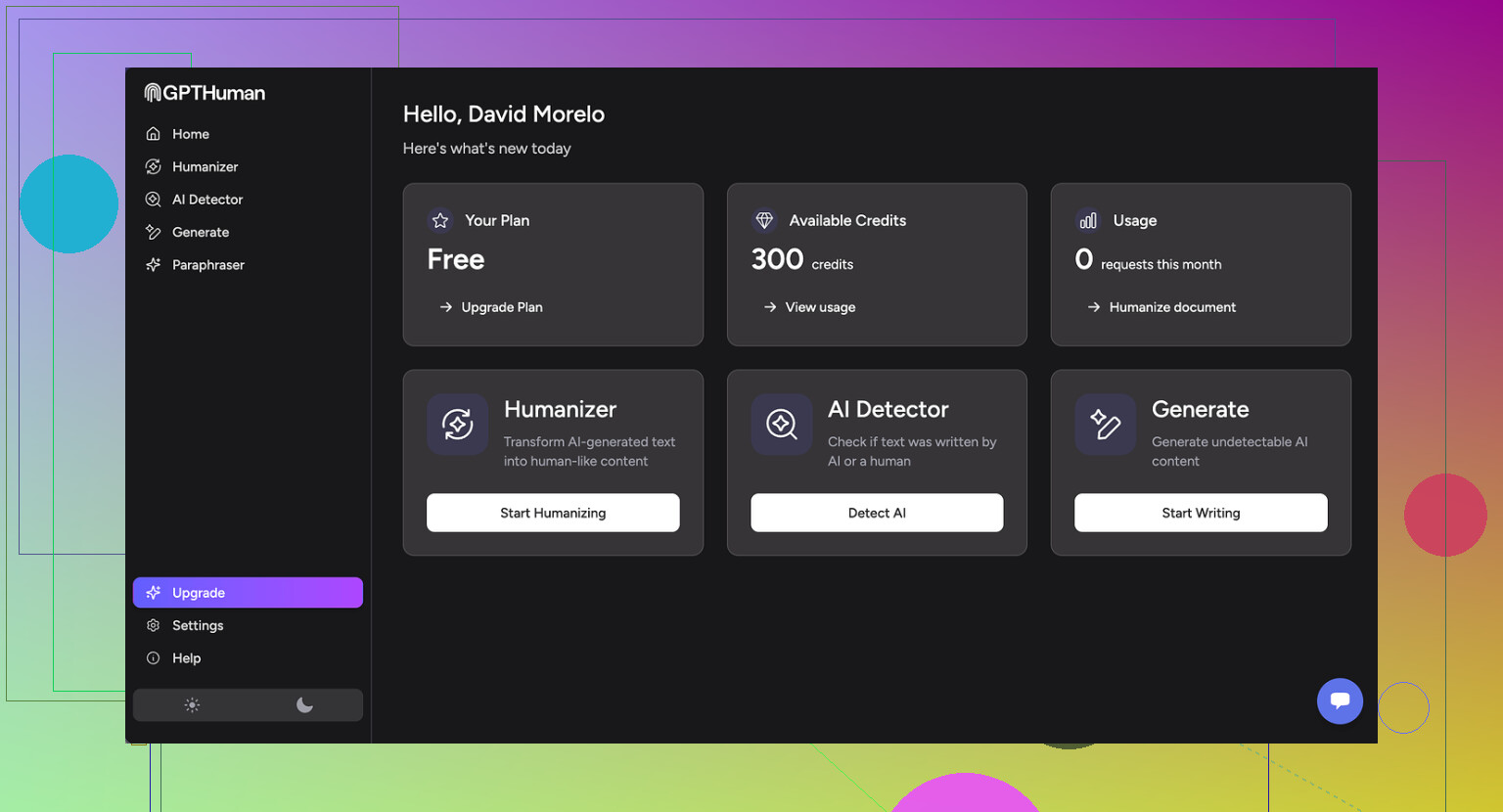
I tried GPTHuman because of the claim on the homepage, something like “the only AI humanizer that bypasses all premium AI detectors.” I was curious and a bit suspicious, so I ran it through my usual test routine.
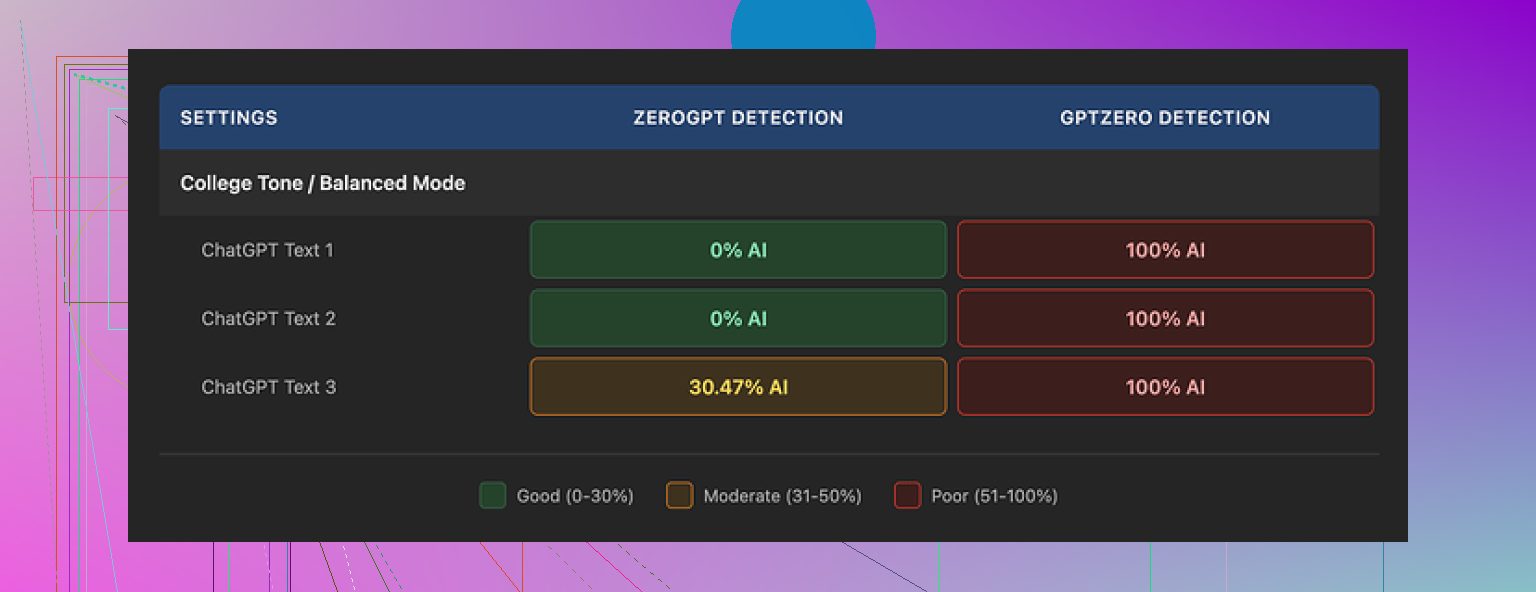
Here is what happened when I ran three samples through detectors:
• GPTZero flagged every single GPTHuman output as 100% AI. No borderline results.
• ZeroGPT gave two of the samples a 0% AI score, then marked the third around 30% AI.
So the tool slipped past ZeroGPT twice, but completely failed against GPTZero in all three runs.
The part that bothered me more was the tool’s own “human score” inside the interface. It showed high pass rates, while the external detectors said the opposite. The score in the app felt disconnected from real detector behavior.
On the writing quality side, the outputs looked neat at first glance. Paragraph structure was fine, no weird spacing or walls of text. Once I read closely, things fell apart:
• Subject and verb did not match in multiple sentences
• Some sentences trailed off or were incomplete
• Word replacements broke the meaning in a few places
• Several conclusions read like the last line got scrambled
The text was readable, but not something I would send as-is to a client or a teacher.
On pricing and limits, here is what I hit:
• The free tier stopped working after about 300 words total. Not 300 per run, 300 across everything.
• I had to spin up three separate Gmail accounts to finish my usual test set. That alone tells you how tight the free tier is.
Paid plans at the time I checked:
• Starter plan: from $8.25 per month if billed annually
• Unlimited plan: $26 per month
The “Unlimited” label is a bit misleading. Each individual output is capped at 2,000 words per run. If you work with long reports, blog posts, or academic work, you will keep splitting text into chunks and stitching it back together.
A few extra policy details that matter:
• All payments are non-refundable
• Your text is used for AI training by default, you have to opt out
• They keep the right to use your company name in their marketing unless you explicitly tell them no
So if you care about privacy, portfolio clients, or NDAs, you need to think through what you paste into it and how you configure the account.
For comparison, during the same benchmark session I tested another tool from Clever AI Humanizer. I logged the scores, and that one came out stronger on detector resistance and was easier to use since it was fully free at the time. You can see my detailed notes and proof screenshots here:
If you are mainly trying to get past strict detectors like GPTZero, my experience with GPTHuman did not give me any confidence. The grammar issues and low free limit made it more of a hassle than a help.
1 Like
You are not going to get much more out of GPTHuman by “better prompts”. Its ceiling is the tool itself.
I agree with @mikeappsreviewer on most points, but my take is a bit different on how to use it without fighting it.
Here is what has worked for me when I tested it for writing, code, and ideas.
- Stop using it for raw content writing
If you want clean articles, emails, essays, it adds more work than it saves.
The substitutions often break grammar and logic. That means you end up line editing almost every sentence. At that point it is easier to write from a normal LLM and then do light human editing.
Better workflow for writing:
• Generate the main text with your main AI (ChatGPT, Claude, etc.).
• Edit yourself for tone and structure.
• If you really want a humanizer step, run only short, sensitive sections through a tool.
For that job, Clever Ai Humanizer has given me more consistent detector scores and fewer grammar issues.
-
Avoid it for code help
GPTHuman is a bad fit for code.
Any tool that aggressively rewrites tokens or wording tends to corrupt syntax, variable names, comments, or even logic.
You want your code helper to be precise, not “humanized”.
Best pattern:
• Use a normal code-focused AI for explanations, refactors, and snippets.
• Keep GPTHuman out of the coding loop.
If you must hide AI use in code comments, rewrite comments yourself. The risk of broken code is too high. -
Use it only for minor surface edits
Where GPTHuman is somewhat useful:
• Rephrasing short social posts where detection is strict.
• Tweaking short product descriptions.
Even there, keep snippets under 200 to 300 words and then proofread manually.
Do not rely on the internal “human score”. Trust external detectors if that is your goal. -
Prompt and settings tips that help a bit
You will not fix the core issues, but you can reduce damage.
Input rules I use:
• Feed it clean, well structured text. If the input is messy, the output gets worse.
• Avoid advanced vocabulary in the input. Simple text survives the rewrite better.
• Do not send conclusions, formulas, or dates through it. Rewrite those manually.
Prompt style when you have any control:
• “Keep all facts, numbers, and names unchanged. Only rewrite style in a natural way.”
• “Do not change technical terms, code, or formulas. Keep every sentence logically complete.”
You still need to check it, but you will see fewer meaning shifts.
- Workflow for idea generation
For idea generation, GPTHuman adds no value.
Use a main LLM to:
• Brainstorm outlines and angles.
• Generate lists of headlines or hooks.
• Expand bullet points into rough sections.
Then, if you care about AI detection on the final output, run only the final polished text through a humanizer like Clever Ai Humanizer, and again, only if needed. I treat humanizers as the last optional filter, not the main writing tool.
- About detectors and expectations
Detectors are noisy and inconsistent.
I have seen text written by humans get flagged, and AI text pass.
Your safest workflow if you care about detectors:
• Keep sentence length varied.
• Add your own stories, data, and opinions.
• Edit at least one full pass yourself.
Humanizers help a bit, but they do not fix formulaic structure from upstream AI. That part is on you.
So if your goal is:
• Best quality writing: skip GPTHuman, write with a main AI plus human edits.
• Passing strict detectors: use shorter inputs, heavy manual editing, and treat GPTHuman or Clever Ai Humanizer as small tools, not full solutions.
• Code or ideas: keep GPTHuman out of that workflow entirely.
Short version: you’re not “missing a magic setting.” The ceiling of GPTHuman is roughly what you’re already seeing.
I agree with most of what @mikeappsreviewer and @mike34 said, but I’ll push back on one thing: I don’t think GPTHuman is totally useless for content, it’s just only good in a very narrow lane.
Here’s how I’d realistically use it (and where I’d avoid it) based on your use cases:
1. Content writing
If your goal is quality writing, using GPTHuman as the main step is backwards.
What actually works decently:
- Write with a strong LLM first (ChatGPT, Claude, etc.).
- Do one honest human edit for:
- Facts
- Tone
- Structure (intro, flow, conclusion)
- Then, only if you’re facing aggressive AI checks, send small chunks through GPTHuman:
- 150–250 words at a time
- No stats, dates, or key claims
- Re-read every sentence like you’re grading a student paper. Fix broken logic, tense shifts, weird synonyms.
Where I slightly disagree with the others: I’ve had a few cases where a lightly edited GPTHuman paragraph plus my own rewrites slipped through multiple detectors “ok enough” for low-stakes stuff like casual blog posts. Still wouldn’t trust it for academic or client-critical work.
If AI detection really matters to you, I’d honestly put more weight on:
- Varying sentence length and structure yourself
- Injecting your own stories, opinions, and little side comments
- Manually rewriting intros and conclusions from scratch
That does more than any “humanizer knob.”
Also: if you care about both detection and readability, Clever Ai Humanizer has been more sane in my tests. Still needs editing, but fewer completely broken sentences.
2. Code help
Here I’m 100% with @mike34: GPTHuman and code is like running your code through a drunk thesaurus.
You should not:
- Paste working code into GPTHuman
- Try to “hide AI” in code comments via full auto rewriting
- Let it near config files, markup, JSON, etc.
If you must disguise AI help in code-related stuff:
- Use a normal code assistant to write the code
- Rewrite comments and docstrings manually in your own voice
- Maybe, at most, run a single standalone comment block through a humanizer and then check it against the original line by line
But honestly, detectors on code are a separate mess and tampering with syntax for the sake of “humanization” is how you ship bugs.
3. Idea generation
For brainstorming, GPTHuman adds zero value. It’s a post-processor.
Use a mainstream LLM for:
- Topic ideas
- Outlines
- Angle variations
- Headlines / hooks
Then, for the final public-facing text:
- Edit yourself
- Maybe pass a few sensitive parts through a humanizer at the very end
GPTHuman in the idea stage just means more text you’ll later have to clean up.
4. How to minimize GPTHuman damage if you insist on using it
A couple practical tweaks that aren’t just repeats of what’s already been said:
-
Avoid feeding it your final version
Treat it like a noisy middle step, not the last one. Always do a final manual pass. -
Segment by function
Run only the “filler” parts:- Explanations
- Transitions
- Non-critical descriptions
Keep: - Definitions
- Claims
- Instructions
- Anything with numbers
fully manual.
-
Lock in key phrases
Before you run text, highlight or note:- Brand names
- Product names
- Technical terms
- Exact stats and dates
Then compare output against that list. If any are altered, revert them.
You can’t prompt your way past the inherent limitations, but you can fence off what it’s allowed to mangle.
5. About detectors & expectations
You mentioned “full potential,” but the honest answer is the limit isn’t you, it’s the combo of:
- Detector randomness
- GPTHuman’s rewriting logic
You could:
- Use GPTHuman sparingly on short text
- Use Clever Ai Humanizer when you care more about balancing detection and clarity
- Accept that some detectors will still flag you anyway
And that’s basically the state of the game right now. If you’re spending more time fighting GPTHuman’s grammar than writing, that’s your signal it’s not a “workflow booster” for you, just a noisy filter to use occasionally and very selectively.
Short version: you’re not “missing a secret setting.” You’re already close to GPTHuman’s ceiling, but you can still tighten your workflow by being more strategic about when you use any humanizer and what you feed it.
Let me hit angles the others did not focus on:
1. Think in “layers,” not “prompts”
Instead of hunting for a magic prompt inside GPTHuman, treat your process as layered:
-
Idea & structure layer
Use a strong LLM for:- Outline
- Argument flow
- Examples
- Section purposes
If you rely on GPTHuman at this level, you’re asking it to think, which it is not built for. It is a stylistic blender, not a planner.
-
Draft quality layer
Keep drafting and revising in a serious model until:- Every section has a clear purpose
- Transitions make sense
- Claims and supporting points are obvious
Only after that should you even consider “humanizing.”
-
Surface disguise layer
This is where tools like GPTHuman or Clever Ai Humanizer come in. Their job is superficial: texture, phrasing, detector games. They should not be touching your structure or logic.
If you mix these layers, you end up blaming prompts for something that is actually a tool limitation.
2. Where I actually think GPTHuman can be useful
I disagree slightly with others who treat it as almost unusable. In my tests, it can be tolerable in very specific cases:
-
Low‑stakes, high‑volume text
Things like:- Short affiliate blurbs
- Disposable landing-page variants
- Non-critical social captions for throwaway campaigns
You accept that 10 to 20 percent of the sentences will need cleanup, but you do not care deeply about stylistic consistency.
-
“Second voice” variation
If you want multiple versions of roughly the same paragraph that do not feel like simple paraphrases, you can:- Generate 2 or 3 variants with your main LLM
- Pass only 1 of those through GPTHuman
- Pick the best bits from all three
It occasionally produces phrasing your main model did not choose, which can be useful for A/B testing.
That said, I would not lean on it for anything graded, legal, or client‑critical.
3. Where Clever Ai Humanizer fits differently
Since everyone keeps mentioning Clever Ai Humanizer, here is how it actually differs in a workflow sense, not just “it scores better.”
Pros of Clever Ai Humanizer
-
Smoother grammar out of the box
I find I spend less time fixing subject‑verb issues compared to GPTHuman. That alone makes it more tolerable as a last step. -
Better at preserving logical flow
It still changes phrasing, but it usually keeps the sentence boundaries and idea order intact. That is crucial if you are editing long arguments or technical explanations. -
More predictable behavior on short blocks
For 150 to 300 word snippets, it behaves less “random.” You can build a reliable routine around it.
Cons of Clever Ai Humanizer
-
Still not “plug and forget”
You must reread, especially:- Any claim with numbers
- Domain‑specific jargon
- Nuanced arguments
-
Can smooth things too much
Sometimes it sands off personality. If your original draft already has a strong voice, you may need to re‑inject your quirks after humanization. -
Not a thinking tool either
Same core limitation as GPTHuman: it is a rewriter, not a strategist. You still need a main LLM and your own judgment.
A realistic pattern I’ve seen work: use your main LLM → you edit → optional pass through Clever Ai Humanizer on limited chunks → final human pass. That tends to beat trying to “prompt your way” into better GPTHuman behavior.
4. Content, code, ideas: change where you spend effort
You mentioned writing, code help, and idea generation. Instead of repeating the same “don’t use it for code” advice, let me reframe:
For writing
Optimize for ownership, not “zero AI score”:
- Write your own intro and conclusion from scratch, every time. Detectors often latch on to formulaic openings and closings.
- Mark 1 or 2 sections where your personal experience is central and do not send those through any humanizer at all. That blend of your untouched voice with slightly processed sections is harder to classify cleanly.
Use GPTHuman or Clever Ai Humanizer only on:
- Middle paragraphs that are mostly explanation or generic connective text
- Simple descriptive passages where a synonym swap will not break anything
For code
Treat the presence of a humanizer in your coding workflow as a bug, not a feature:
- Separate “code artifacts” from “explanatory text.”
- Let an LLM help you draft code and explanation.
- If you feel pressure to hide AI use in explanations, only run the explanations through a humanizer, then line‑compare them against the original to make sure no logic changed.
That is still risky, but at least you are not wrecking syntax or variable names.
For ideas
You get the biggest lift by improving how you interrogate your main LLM, not by adding GPTHuman on top.
For example:
- Ask your main model to generate 5 completely different frames for the same topic: story‑driven, data‑driven, contrarian, how‑to, and Q&A.
- Then, instead of humanizing all of them, pick 1 frame and develop it deeply.
Humanizers do almost nothing for ideation. Your time is better spent on prompt iteration with your primary model.
5. Detectors: use them as a meter, not a judge
You saw exactly what many of us see: GPTZero harsh, other tools inconsistent. The trick is to stop thinking in “pass/fail” and start treating detectors as feedback on pattern density:
-
If the detector spikes on a specific paragraph, inspect that paragraph for:
- Repetitive structure
- Overly generic phrasing
- Lack of concrete specifics
Then edit by adding personal detail or changing the rhythm, before sending to any humanizer.
-
Run detectors on a sample, not the whole piece.
If 1 or 2 paragraphs look risky, target those sections with Clever Ai Humanizer rather than carpet‑bombing the entire text with GPTHuman.
This gives you more control and less damage.
6. Where I slightly disagree with others
- I do not think GPTHuman should be “kept out completely” for content; I think it should be treated as a coarse, last‑resort filter for low‑impact passages, not the engine of your writing.
- I also think people sometimes overestimate detector accuracy and underestimate the value of simply editing your own work hard once. A solid manual pass can do more than any specialized humanizer for many real‑world scenarios.
Bottom line:
Use a strong LLM plus serious human editing as your core. Keep GPTHuman in a small, fenced‑off role if you insist on using it at all. If you want a tool that is slightly less destructive to readability, Clever Ai Humanizer is worth trying as your “final cosmetic pass,” with the understanding that it still has pros, cons, and zero magic.