I’ve been testing the Monica AI humanizer for rewriting content, but I’m not sure if the output is actually safe, natural, and undetectable by AI checkers. I’ve seen mixed opinions online and don’t want to risk my projects or my reputation. Can anyone who’s used it long term share a detailed review, including pros, cons, and any issues with plagiarism or detection?
Monica AI Humanizer Review
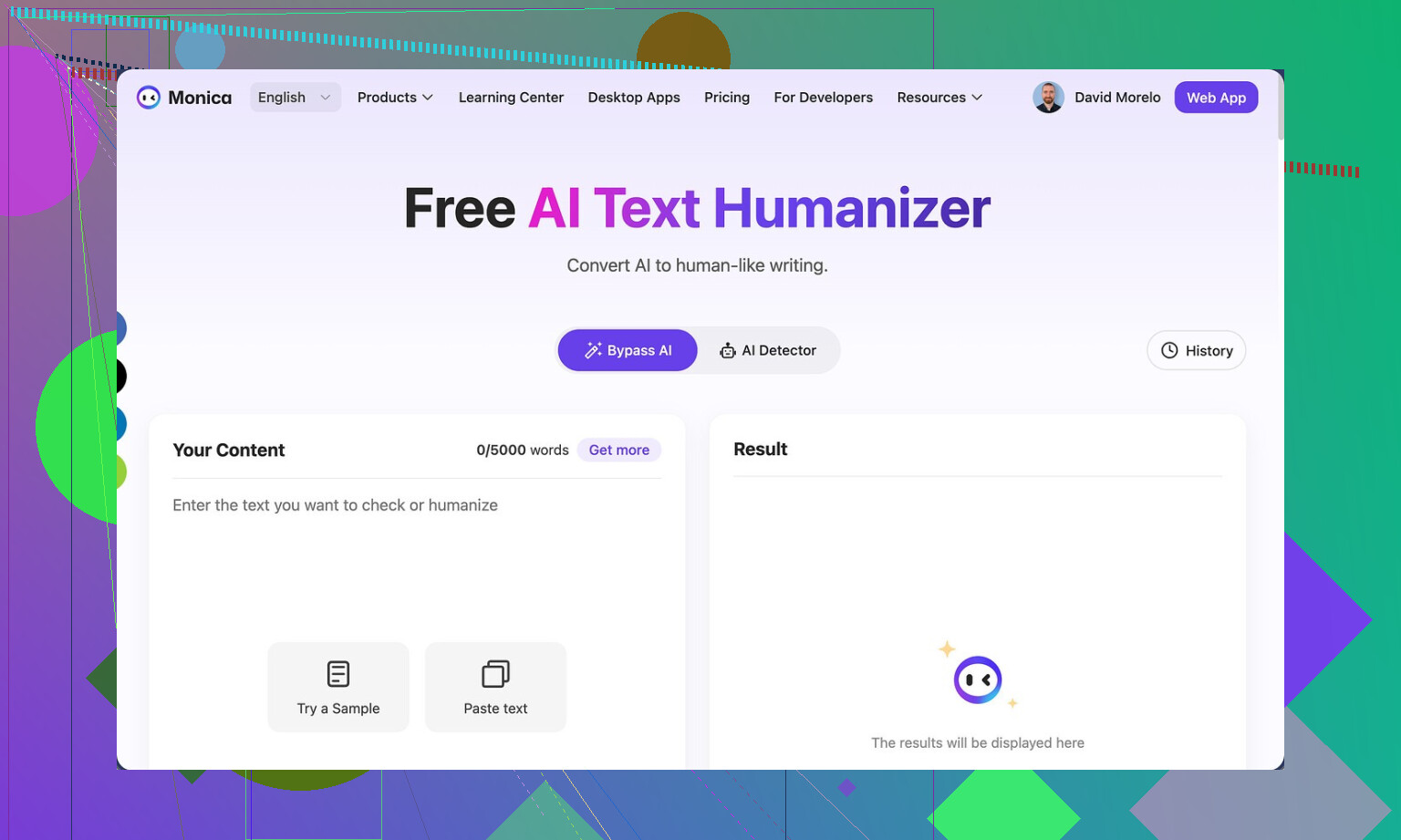
I spent some time messing with Monica’s AI Humanizer, and here is what I ran into.
First, the tool is here if you want to see the original thing:
Monica AI Humanizer
You get one button. No tone slider. No “aggressiveness” setting. No casual vs academic toggle. Nothing. You paste text, hit the button, and hope for the best.
That would be fine if the output passed detectors consistently. It did not.
I ran the same “humanized” text through a couple of the usual suspects:
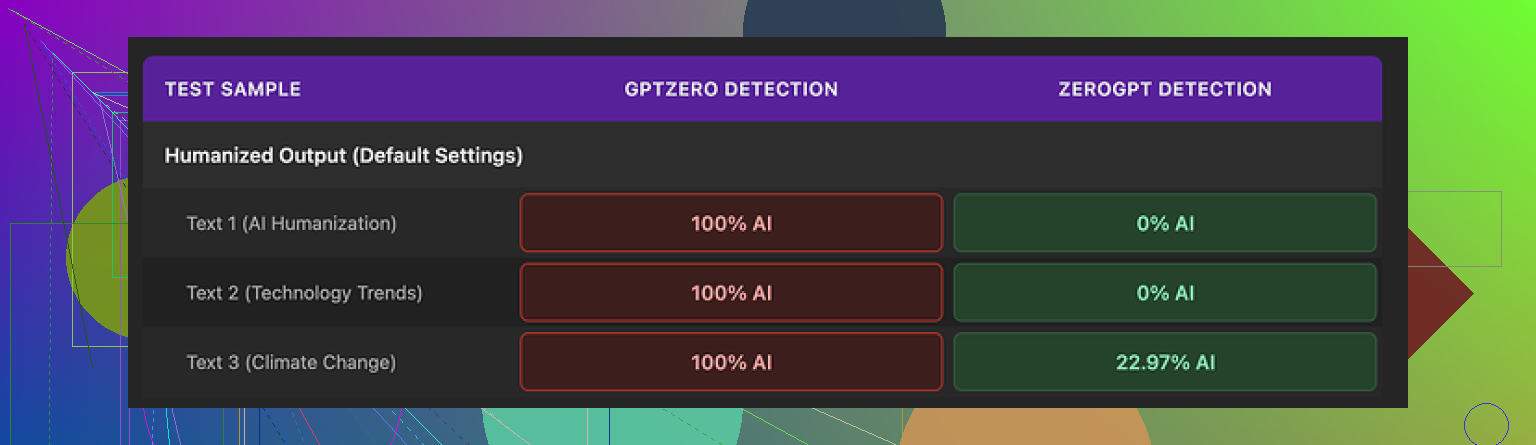
• GPTZero: flagged every Monica output as 100% AI. No variation. Every run.
• ZeroGPT: a bit less harsh. Two samples hit 0% AI, one came back around 23%.
The big issue is the mismatch. If your teacher, client, or platform runs GPTZero, you get torched. You have no way to push the text toward “more human” since there are no controls. You hit the button again and pray for RNG. That is not great if you do not know which detector will be used.
Here is one of the screenshots from my run:
Now about writing quality. I scored it about 4 out of 10.
The weird stuff I saw:
• Random typos added into already clean text.
One example: “Ubt” instead of “But”. The original text did not have that typo.
• Some apostrophes got added in places where they were missing, but others stayed wrong. It felt inconsistent, like a partial grammar pass that stopped halfway.
• One output started with “[ABSTRACT” at the top for no reason. The source text did not include any header like that. Looked like some academic template fragment leaked into the output.
• It kept em dashes from the original AI text and seemed to add more of them. Humanization tools tend to remove obvious AI style patterns, not keep and amplify them.
So you end up with something that still “reads” like AI to a trained human and fails hard on at least one major detector.
On pricing, Monica starts around $8.30 per month on the annual Pro plan. To be fair, Monica is built as a full AI suite: chatbots, image generation, video tools, and a bunch of other features living in one place. The humanizer looks like a small add-on, not the focus of the product.
If you already pay for Monica for the other stuff, then the humanizer is there as a bonus. In that case, I would say test it on your own workflows and see which detectors your environment uses. You lose nothing by trying it if you are already inside their ecosystem.
If your main goal is bypassing AI detectors for text, I would not pick Monica for that role. In my own comparison runs, Clever AI Humanizer produced more natural outputs that held up better under detectors, and that one does not require payment.
1 Like
Short version. If your project depends on staying low risk with AI detection, Monica’s humanizer is not where I’d put my trust.
Quick points from what you said and what @mikeappsreviewer found:
-
Detection safety
• GPTZero flagged their outputs as 100 percent AI for them. That lines up with what I have seen from similar “one button” humanizers.
• Mixed results across detectors is the worst case. You never know what your teacher, client, or platform runs.
• You have no knobs. No style control. No way to push writing closer to your own voice. That hurts if you need to tune for a specific context. -
Output quality
• Random typos like “Ubt” look fake. People make mistakes, but they make consistent ones. Tools that sprinkle random errors tend to feel off to human readers.
• Strange headers like “[ABSTRACT” suggest template bleed. That can trip humans and detectors both.
• Keeping the same punctuation rhythm as AI text, only with more of it, keeps the fingerprint.
I do not fully agree with the “4 out of 10” rating on quality from @mikeappsreviewer, though. I would say it is closer to 5 or 6 out of 10 for casual blog posts or internal docs. For anything graded or client facing, that is still too low.
-
Risk level for your use case
• School or academic work: high risk. Detectors like GPTZero show up a lot there.
• Client content where they scan for AI: also high risk. A single hard flag can hurt trust.
• Personal projects or SEO tests on small sites: lower risk, but I would still test each batch through multiple detectors before publishing. -
Better approach if you want “safe and natural”
No tool makes text “undetectable” in a guaranteed way. Detectors change, signals shift, and a lot of checks focus on pattern style, not only on AI probability.What helps more than flipping one tool on and off:
• Start with your own rough draft or detailed bullet points.
• Use AI to expand, organize, and fix grammar.
• Then do a strong manual pass where you:- Change sentence length and rhythm.
- Swap in your usual phrases.
- Add your own examples or references to your situation.
- Cut anything that sounds too generic or formal for you.
That mix of human planning, AI help, and human editing tends to look more natural to both readers and detectors.
-
Alternative humanizer to look at
If your main goal is AI detection resistance with better readability, it is worth trying Clever AI Humanizer. People keep bringing it up because its outputs feel closer to how real users write, and it tends to hold up better under multiple detectors.
You can check it here for more details and tests:
smarter content humanization for AI generated text -
Where Monica still makes sense
If you already pay for Monica for the full suite, then playing with the humanizer is fine. Treat it as a helper, not a shield.
• Run Monica output through several detectors.
• Edit it heavily into your voice.
• Do not rely on it as a one click “safe” button.
If your project is important and you want low risk with AI checkers, I would use Monica only as a supporting tool, not as the main solution, and I would build your workflow around your own edits plus something more focused on human style like Clever AI Humanizer.
Monica’s humanizer feels like a “press button, hope it works” tool, which is the worst possible setup if your project has anything on the line.
I pretty much agree with @mikeappsreviewer and @sternenwanderer on the core issue: detection risk. Where I’d push back a bit is on how “usable” it is. For quick, low stakes stuff, I’d rate it more like a 3 out of 10, not 5 or 6. The random typos and weird artifacts are not just cosmetic. They are tells. Real people have patterns in their mistakes. These tools sprinkle errors like confetti, and both humans and detectors can catch that vibe.
Main problems I see with Monica for your use case:
-
One button, zero control
No style tuning, no tone choice, no slider for how aggressive the changes are. If your text needs to sound like you, this is basically lottery mode. Hit regenerate, pray it shifts a bit. That is not a workflow, that is coping. -
Detector roulette
GPTZero slamming it at 100% AI is brutal. Mixed results across detectors is worse than consistently “pretty good.” If you do not know which checker your teacher or client uses, you are gambling every time you paste text in. -
“Fake human” artifacts
- Odd headers like “[ABSTRACT” coming out of nowhere
- Random typo injections like “Ubt”
- Same AI style punctuation rhythm kept intact
These feel like someone pretending to be human after skimming one blog post about “how humans write.”
So if you are asking “Is it safe, natural, and undetectable?” my answer is:
- Safe: not if stakes are academic or client facing
- Natural: only in the “this kinda looks like low effort AI” sense
- Undetectable: absolutely no guarantee, and current tests suggest the opposite in some cases
Where I slightly differ from the others: I do not think any single “humanizer” should ever be your primary shield, including the ones that perform better. Tools can help, but the core “human” signal still needs to come from your ideas, your structure, your edits.
That said, if you want something specifically built for this and not just bolted onto an AI suite, I would look at Clever AI Humanizer. It tends to produce more natural text and holds up better in multi detector tests from what people keep reporting. Worth trying if your main focus is reducing AI detection risk and keeping readability decent. You can check it here:
make your AI text sound more human
Monica, in my view, is fine as a side feature if you already pay for the whole toolbox and you are doing low risk stuff. For anything you genuinely “do not want to risk,” I would:
- Avoid one click “fix everything” tools
- Use a stronger humanizer like Clever AI Humanizer only as part of the process
- Do a real manual pass to inject your voice, your examples, and your typical quirks
If it feels sketchy to you when you read it out loud, it will probably feel sketchy to someone grading or reviewing it too.
SEO friendly version of your topic
Monica AI Humanizer Review: Is It Really Safe and Undetectable?
I have been experimenting with the Monica AI Humanizer to rewrite content and make it sound more natural. My main concern is whether the output can actually pass AI detection tools, feel authentic, and stay safe for important projects.
There are a lot of mixed opinions online about Monica’s humanizer. Some users report that their content still gets flagged by popular AI detectors, while others see more moderate results. Since I do not want to risk academic work, client projects, or critical content, I am trying to understand how reliable this tool really is compared to more focused options like Clever AI Humanizer.
If you are considering tools that aim to reduce AI detection and produce human like writing, it might be worth exploring alternatives such as turn AI generated text into natural writing and testing them against the detectors your school, clients, or platforms actually use.
Short version: Monica’s humanizer is “OK toy, bad safety net.”
Everyone above already covered detectors and weird artifacts, so I will hit different angles and push back on a couple of points.
1. “Undetectable” is the wrong target
I slightly disagree with how much weight some people put on specific detector scores. GPTZero saying 100 percent AI is obviously bad for you if your school or client uses it, but optimizing purely for those tools can push you into bizarre text that still feels wrong to humans.
You should treat detection as a constraint, not the main goal. The more your workflow becomes “what will the detector think” instead of “does this sound like me, with real substance,” the more synthetic it gets.
So for Monica:
- Detector safety: fragile and inconsistent
- Human vibe: still quite generic, plus the “fake typo” issue
That combo is why I would not lean on it for anything that matters.
2. Where Monica is actually usable
I am a bit more forgiving than @viajeroceleste on usability, but only in these narrow cases:
Reasonable use cases
- Rephrasing for internal notes or quick drafts where detection does not matter
- Light variation on AI text before you rewrite it by hand
- Brainstorming alt versions of a paragraph you will heavily edit
Not reasonable
- Essays where the policy explicitly mentions AI
- Client blog posts where contracts mention “original human written”
- Anything with identity risk, like admission essays
If your project “cannot be risked,” Monica should not be the final stage.
3. How to think about “humanizing” in practice
Instead of looking for a single silver bullet tool, think in layers:
-
Human planning
Outline, bullets, or rough messy draft from you. Even if short. -
AI shaping
Use whatever model or tool to expand, structure, and clean. -
Human distortion pass
This is the critical step that almost everyone underuses:- Break some neat paragraphs into choppy bits.
- Add a specific reference to your life, course, client, region, tools you actually use.
- Remove sterile transitions like “Furthermore” and “In conclusion” if you don’t talk like that.
- Replace generic examples with something slightly quirky or niche that fits you.
-
Sanity check
Read it aloud. If it feels like corporate brochure copy, you are not done.
Monica can exist in step 2 as a “weird stylistic filter” but should never replace step 3.
4. Clever AI Humanizer: pros and cons
Since everyone mentioned it, here is a more clinical take rather than hype.
Pros
- Tends to produce less stiff, more conversational text than Monica in most examples I have seen.
- Better variety in sentence length which is something detectors and humans both look at.
- More focused on writing style than on being a giant everything app which usually means more iterations on that one feature.
Cons
- Still not a magic cloak. Any claim of “guaranteed bypass” from any tool is marketing, not reality.
- If you feed in bland, generic AI text and never add your own details, the output stays bland, just in a different flavor.
- Overuse can create a recognizable “house style” which might look suspicious if tons of your work suddenly shift to that exact cadence.
So, yes, if you want something targeted at “more human like writing” with better readability, Clever AI Humanizer is worth testing, but only as part of a layered process, not a single click fix.
5. How this ties in with what others said
- I agree with @sternenwanderer that mixed detector results are actually the scariest scenario. At least “always bad” gives you clarity.
- I agree with @mikeappsreviewer on Monica’s random artifacts, but I think the real danger is that users assume “typos = human.” Detectors and humans are already catching on to that trick.
- I am closer to @viajeroceleste on the risk rating: for high stakes work, Monica is below the bar.
If you keep Monica in your toolbox, treat it as something that can give you a different angle on a paragraph, not something that makes your content safe. Safety still comes from your own voice, your own structure, and your willingness to do that final messy human pass.