My pen drive suddenly became corrupted after I plugged it into my laptop, and now I can’t open it or access important files I need for work and personal documents. I’m looking for safe ways to recover data from a corrupted USB flash drive without making things worse. If anyone knows reliable recovery steps or software that actually works, I’d really appreciate the help.
Start with the boring checks first
I’d avoid repair tools at the start. With USB corruption, the fix depends on what failed, and those are not all the same thing.
When I’ve dealt with bad flash drives, I checked a few basics first:
- Does it show up in Disk Management?
- Does Windows report the right size?
- Is the file system listed as RAW?
- Do you get a format prompt?
- Does another PC see it?
- Does it drop connection, freeze, or crawl at weirdly low speeds?
Those answers narrow it down fast.
If the drive appears in Disk Management and the capacity looks right, I’d say your odds are still decent for home recovery. If it keeps disconnecting, never shows up, gets hot, or the plug looks bent or loose, I’d stop thinking ‘software issue’ and start thinking ‘hardware is going bad.’
Pull the files first, fix the drive later
This part matters more than people think. Corruption is often the symptom, not the root problem. I’ve seen people run repairs first, then end up with fewer recoverable files than they had at the start.
So if the USB is still readable enough for software to access it, I’d try to copy data off before doing CHKDSK, formatting, or any cleanup.
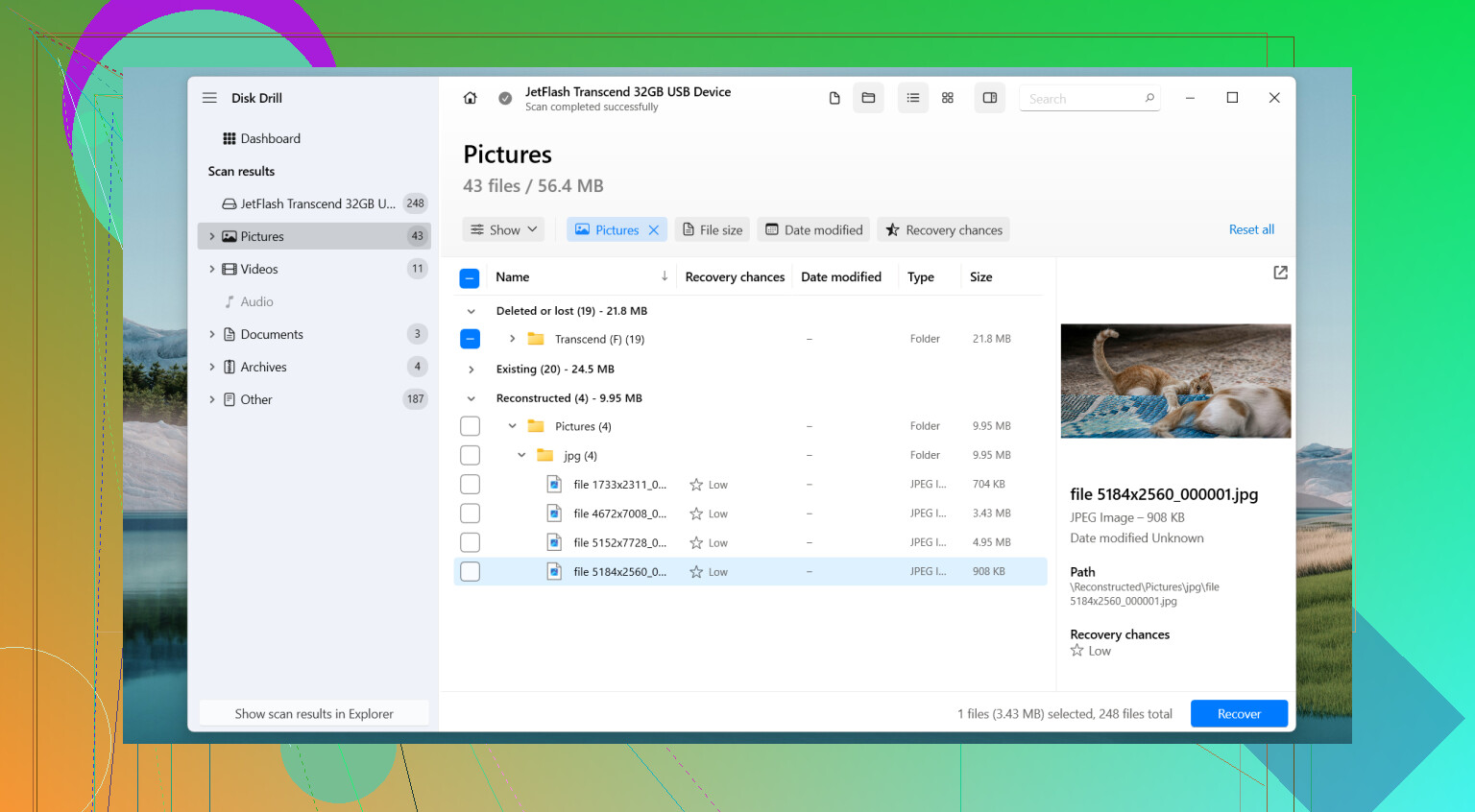
For this kind of job, I’d use Disk Drill.
What I liked about it on damaged USB sticks was simple. It does not depend only on the file system being healthy. Even when Windows refuses to open the drive normally, it often scans the device itself and rebuilds files from raw data. In my use, folder structure came back better than with a lot of other recovery apps, and the preview tool saved time because I could check whether files were intact before copying them out.
The part I would not skip
The Byte-to-Byte Backup feature is the main reason I’d use it here.
If the flash drive is unstable, scanning it over and over is a bad bet. I’d make a full image first, sector by sector, and save it somewhere else. Then I’d do the recovery work against the image, not the USB stick.
That gives you one frozen copy of the drive in its current state. If the USB gets worse later, and some do, you still have something to work from. I learned this one the hard way with a cheap 64 GB stick years ago. It mounted twice, then started vanishing mid-transfer. The image I made early was the only reason I got most of the files back. Misspelled folder names and all.
The order I’d use
- Install Disk Drill.
- Plug in the USB drive.
- Open the Byte-to-Byte Backup option.
- Make a full image of the USB and save it to a different disk.
- Mount or attach the image inside Disk Drill.
- Scan the image.
- Preview what it found.
- Recover the files you care about to another storage device.
Not back to the same USB. I know it sounds obvious, but people do it.
After your files are safe
Only then would I mess with the drive itself.
Depending on what you saw earlier, I’d try one of these:
- Run CHKDSK.
- Assign a different drive letter.
- Reinstall the USB drivers.
- Use Windows Error Checking.
- Do a full reformat.
If the corruption came from a minor file system mess, one of those might clean it up. If it keeps acting flaky after a format, I’d stop trusting it.
When I’d stop doing this myself
I’d look at a pro recovery service if any of these happen:
- The system does not detect the drive at all.
- The connector is damaged or the stick shows other physical damage.
- The data matters enough where mistakes would hurt.
- The drive starts disconnecting during imaging or scanning.
That last one is nasty. Repeated retries on a failing device are how people turn a rough recovery into a dead one.
Keep it or toss it
After recovery, I would not feel any loyalty to the flash drive. If corruption showed up with no clear cause, came back after formatting, or the drive started behaving oddly in normal use, I’d replace it.
USB flash drives wear out. Some last a long time. Some go weird out of nowhere. Once one starts acting unreliable, I treat it like it already gave notice.
2 Likes
Don’t write anything to the pen drive yet. No format, no repair, no copy back. Every write cuts recovery odds.
I agree with @mikeappsreviewer on one big point, recover first. I disagree a bit on CHKDSK even later, because on flaky flash drives I’ve seen CHKDSK turn a messy file table into a worse mess. If the files matter, I skip it until recovery is done and verified.
What I’d do next:
- Test the USB on a different port and different PC.
- Check if it shows in File Explorer, Disk Management, or Device Manager.
- If it asks to format, hit cancel.
- If the drive stays connected, scan it with Disk Drill.
- Recover files to your laptop drive or another external drive, not the same USB.
Why Disk Drill? It handles RAW and corrupted USB volumes better than a lot of simple file copy tools. Preview helps you check docs, pics, and vids before recovery. If the stick is unstable, make an image first and scan the image. That saves wear and cuts repeated reads.
If the USB keeps disconnecting, shows 0 bytes, or gets super slow like under 1 MB/s, I’d stop home fixes. That points to failing hardware, not a small filesystem issue.
Also, this short video is decent if you want a quick visual walkthrough for USB data recovery steps:
quick Instagram guide to recover files from a corrupted USB drive
After you get the files out, full format the pen drive and test it. If it throws errors again, toss it. Cheap flash media fails a lot sooner than people think. I’ve had two die in the same month, so yeah, fun stuff.
One thing I’d add to what @mikeappsreviewer and @techchizkid said: check whether the problem is actually the partition table and not just the filesyste,m because that changes what recovery tools can still “see.”
If Windows shows the USB as Unallocated in Disk Management, don’t jump straight into repairs. In that case, partition recovery can sometimes bring the volume back faster than file-level repair. I still agree with them on one point though: do not write anything new to the pen drive.
I’m slightly less sold on trying too many Windows fixes afterward, honestly. Flash drives that corrupt once for “no reason” often do it again. Even if you recover it and reformat it, I wouldn’t trust it for work files.
What I’d do:
- Check SMART is not possible on most cheap USB sticks, so judge by behavior
- If it connects consistently, recover files first with Disk Drill
- If the partition is missing, scan for lost partitions and files
- Recover only to your PC or another external drive
- If recovered files open fine, replace the USB anyway
Also, if your docs are super important, test recovered files right away. I’ve seen people recover hundreds of filenames and then realize half the actual content was busted. That part kinda sucks.
For more USB data recovery ideas, this thread on how to recover files from a faulty USB drive safely is worth reading.
Short version: recover first, repair later, and maybe retire that pen drive before it ruins your week agian.