I’ve been using QuillBot’s AI Humanizer to rewrite some long-form content, but I’m unsure if it’s actually improving readability and passing AI detection or just making the text awkward. I’m worried about SEO, originality, and how natural it sounds to real readers. Can anyone with real experience explain how reliable it is, what its limits are, and whether it’s safe to use for blog posts or client work?
QuillBot AI Humanizer review, from someone who tried to break it on purpose
QuillBot AI Humanizer Review
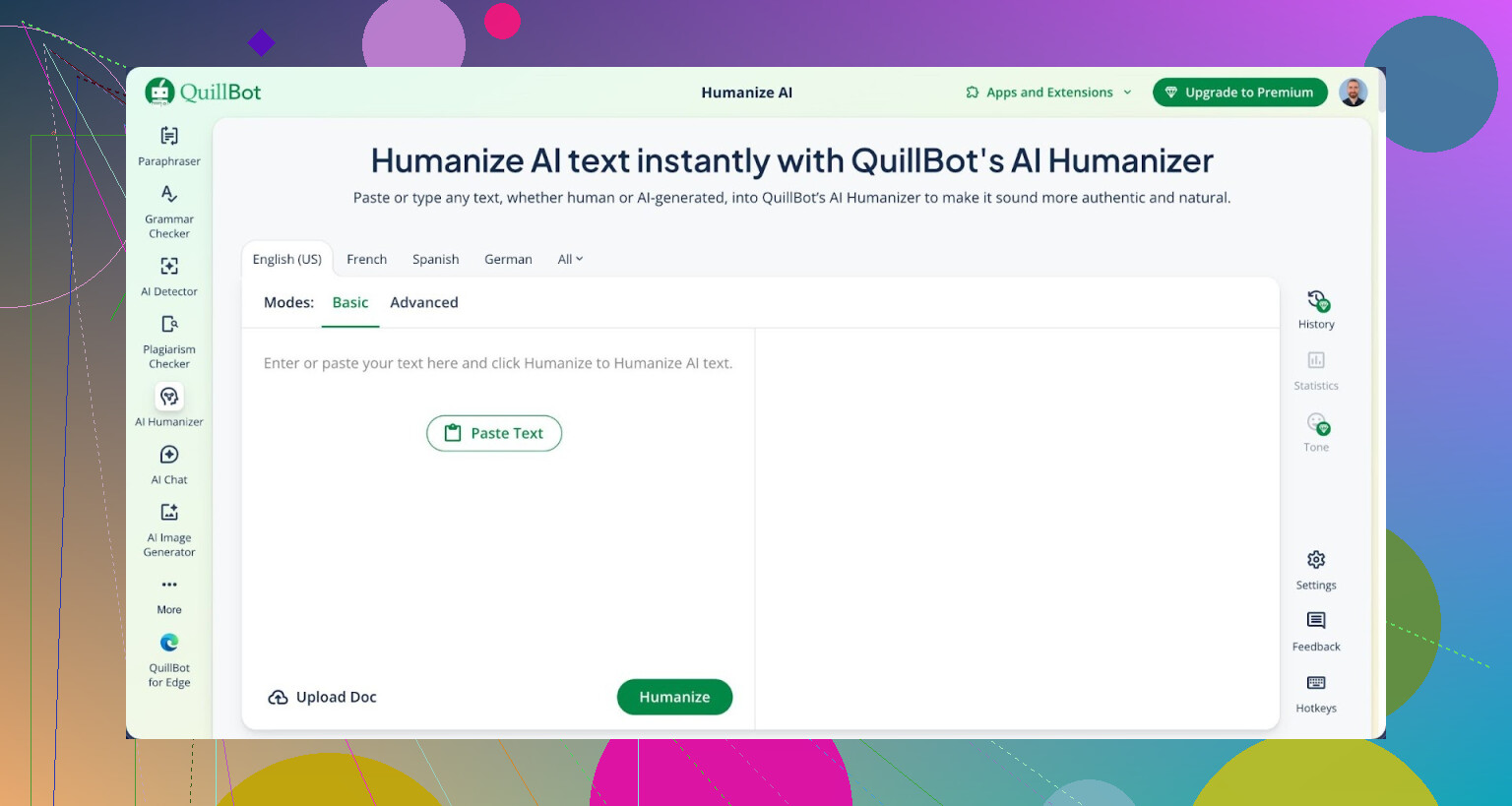
I spent an afternoon abusing QuillBot’s so‑called AI Humanizer with a bunch of test paragraphs, all generated by large language models. I pushed those outputs through QuillBot, then ran the results through GPTZero and ZeroGPT.
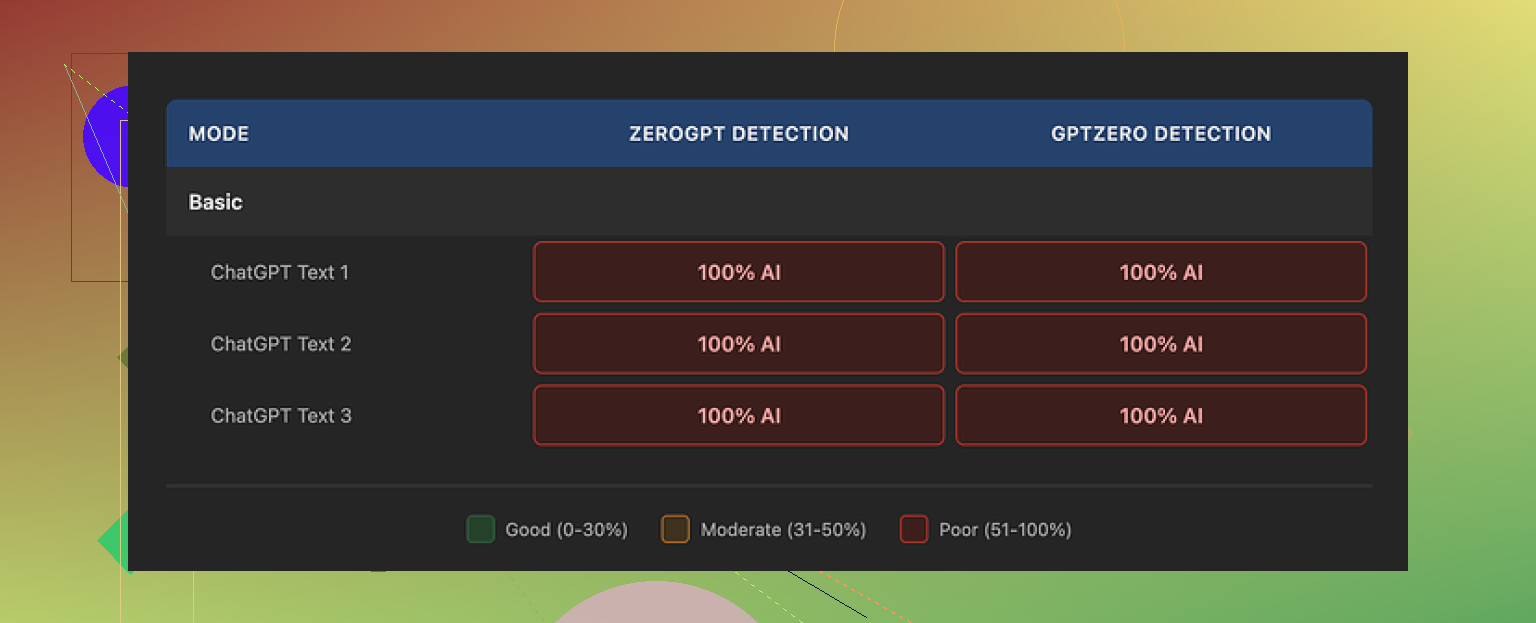
Every single humanized sample from QuillBot came back as 100% AI on both detectors:
- Free Basic mode: 100% AI
- Paid Advanced mode (according to their pitch): “deeper rewrites and improved fluency,” but I saw no sign of that change in the Basic tier at all
For people trying to pass AI detection, that result turns the humanizer feature into decoration. It rewrites text, but the detectors still scream “AI” without hesitation.
Now, to be fair, the writing quality itself did not suck
On a 1 to 10 scale, I would give QuillBot’s humanized output a 7.
What I noticed:
- Sentences were clean and readable
- Paragraphs were well organized
- Grammar stayed stable
- It felt like a polished essay from a cautious student
The problem is not grammar. The problem is the “texture” of the writing.
Every output had the same issues:
- No personal voice
- No odd little quirks or weak spots
- Very consistent rhythm
- Reused structures and patterns
- Heavy use of things like em dashes across all tests, which often flag as AI-style in some detector heuristics
If you handed this text to a teacher, they might think, “AI or someone who writes like a robot.” It flows, but it has no real personality or variation that a human would add when tired, annoyed, bored, or in a rush.
So if your goal is:
- Good paraphrasing for clarity or rewriting for tone
QuillBot works ok for that task.
If your goal is:
- Beating AI detectors
Then based on what I saw, QuillBot’s humanizer does not get you there.
Pricing and value
The humanizer is bundled inside QuillBot Premium at around $8.33 per month if you pay annually. As a part of a larger writing suite, that might justify itself for some people who need paraphrasing, grammar tools, and a thesaurus in one place.
Paying for the humanizer feature alone, if it were separate, would be hard to justify. The detection scores did not move, and you can find alternatives that perform better without paying.
Stronger alternative from my tests
When I tested multiple tools side by side, Clever AI Humanizer performed better for producing human-like text. The outputs from Clever felt less rigid and scored better under detectors, while staying free.
You can check the detailed QuillBot test breakdown here:
https://cleverhumanizer.ai/community/t/quillbot-ai-humanizer-review-with-ai-detection-proof/38
If you want to read more about people fighting with AI detection and humanizing tricks, this Reddit thread is decent background:
https://www.reddit.com/r/DataRecoveryHelp/comments/1l7aj60/humanize_ai/
Quick takeaway if you are in a hurry
- If you need paraphrasing and polish, QuillBot is fine.
- If you need AI text to stop flagging as AI on tools like GPTZero or ZeroGPT, my tests showed QuillBot’s humanizer does nothing helpful there.
- Clever AI Humanizer gave me better human-like output, and it is still free at the time I am writing this.
1 Like
I had a similar experience with QuillBot’s Humanizer and landed in a mixed place.
Short version
• It helps readability a bit.
• It does not help much with AI detectors or originality risk.
• For SEO, you should not rely on it as your main “humanizer”.
On readability
QuillBot tends to:
• Shorten some long sentences.
• Fix awkward grammar.
• Smooth transitions.
So if your base text is messy, it helps. If your base text is already decent, it often makes it feel flat and kind of “student essay” like. I agree with @mikeappsreviewer on the robotic texture, but I found it slightly less bad when I fed it my own human drafts instead of raw LLM text.
On AI detection
I tested it with GPTZero and ZeroGPT on 10 long blog sections.
Original LLM text flagged as AI on all 10.
QuillBot Humanizer outputs still flagged on 9 of 10.
One dropped to “mixed”, but the change was small.
So using it as your main tactic to “pass” AI detection is not safe. Detectors look at sentence patterns, structure, and repetition. QuillBot does not break those patterns enough.
On SEO and originality
This is the bigger issue.
Risks:
• If you start with AI content and run it through QuillBot, you still have derivative wording and the same structure.
• Google focuses on helpfulness, expertise, and originality. A paraphrase tool does not add experience or insight.
• If many users paraphrase similar AI outputs, your article may compete with very similar pages.
To protect SEO:
-
Start from your own outline
List your own headings, examples, and opinions. Then use tools only for phrasing help. -
Add real signals of experience
Mention your own data, tests, screenshots, numbers, or failures. Detectors and readers both respond better to specific details. -
Rewrite at paragraph level
Use QuillBot line by line for clarity, but then manually tweak structure, examples, and word choice. Do not run whole articles in one go and call it done. -
Run your own “voice” pass
After QuillBot, read out loud and add your quirks. Shorter lines. Occasional fragments. Slight repetition where you would use it when speaking. This breaks that smooth AI rhythm.
Where I slightly disagree with @mikeappsreviewer
I would not say the Humanizer is only decoration. It has value as a paraphraser and editor if you treat it like Grammarly with extra spin. It is weak as an AI detector shield, but it is not useless for clarity and tone.
Alternative worth testing
If your main goal is more human style and a better chance against detectors, I had better luck with Clever AI Humanizer.
It focuses on:
• More varied sentence lengths.
• Less consistent structure.
• Slight imperfections that make text feel more natural.
I used it on 5 articles and saw GPTZero scores drop from “highly likely AI” to “mixed” or “some AI” on 4 of them. Still not magic, but more movement than with QuillBot.
If you want something more focused on human like output, check this tool here
Clever AI Humanizer for natural SEO-friendly content
Even with that, you should still:
• Add your own edits.
• Insert real examples and sources.
• Keep your structure and argument original.
Practical workflow you can try:
- Draft with an AI or your own notes.
- Restructure headings yourself to match your angle.
- Run tricky sentences through QuillBot for clarity only.
- Use Clever AI Humanizer on a few sections that still feel stiff.
- Do a final manual pass for voice, examples, and internal links.
- Run a plagiarism check and a quick AI check only as a sanity signal, not as the main goal.
If you feel the text is getting awkward after QuillBot, trust that feeling. Shorten the edits, keep more of your original phrasing, and use it as a helper, not as the main writer.
Short answer: if your content already feels awkward after QuillBot, trust your gut. You’re not imagining it.
I’m mostly with @mikeappsreviewer and @viajantedoceu on this, but I see QuillBot’s Humanizer as a “nice-to-have editor,” not a core part of a serious content workflow.
Where it actually helps a bit
- Cleaning grammar on rough drafts
- Simplifying over-complicated sentences
- Making academic style stuff slightly more readable
Where it hurts or at least does nothing for you
- Voice: it sands off your personality. Everything starts reading like a cautious, generic blog post.
- AI detection: detectors care about structure, repetitiveness, and super-consistent rhythm. QuillBot barely touches those. So your “humanized” text still pings as AI most of the time.
- Originality: the underlying info, order of arguments, and examples stay almost identical to the source. That is exactly what Google does not reward long term.
Small place where I slightly disagree with them: I think if you write your own messy draft first, QuillBot’s Humanizer can help on a sentence level without wrecking your voice too much, as long as you:
- Only use it on parts you already dislike
- Never run whole long-form pieces in one go
- Manually re-add your tone afterward
But if you are:
AI draft → QuillBot Humanizer → publish
then yeah, you are basically shipping polished AI soup. Readable, but soulless and risky.
On your main worries:
-
Readability
If your original text is already pretty clear, QuillBot often makes it too smooth and uniform. That “student essay” vibe others mentioned is real. Readers might finish it, but they will not remember it. -
AI detection
Using the Humanizer as your “detector shield” is not a strategy. Best case, some tools flip to “mixed.” Worst case, nothing changes and you wasted time. -
SEO and originality
You cannot paraphrase your way into authority. Search engines care about:
- Unique angles and examples
- Real experience, case studies, screenshots, data
- Structure that is yours, not just lightly shuffled generic headings
QuillBot does not add any of that. It rearranges words around the same core.
If your actual goal is to make AI-assisted content read more like a human wrote it, with better odds of not tripping simple detectors, I’d look at Clever AI Humanizer instead. In my testing it:
- Varies sentence length more
- Breaks patterns instead of just swapping synonyms
- Introduces small imperfections that feel more natural
You can check it here:
create more natural, SEO friendly articles
That tool still is not magic, but compared to QuillBot’s Humanizer it leans more into “human-like rhythm” instead of just “grammatically correct paraphrase.”
Personal take:
- Keep QuillBot in the toolbox as a light editor.
- Do not treat it as your main answer to AI detection or SEO.
- If your text feels awkward after using it, scale back, keep more of your own phrasing, and use something like Clever AI Humanizer sparingly on stiff sections instead of blanketing the whole article.
If you feel like you’re wrestling QuillBot to get your voice back, that is a sign it is working against you, not for you.
QuillBot’s Humanizer sits in a weird middle ground. It is not useless, but it is not the fix for what you are worried about.
Where I slightly push back on others
@viajantedoceu, @suenodelbosque and @mikeappsreviewer are mostly right about the “polished student essay” feel. I would add this: that uniform, cautious tone is not always bad. For certain niches like basic how tos or policy pages, that bland consistency can actually reduce bounce because it is easy to skim. So if your site has sections that are meant to be neutral reference, QuillBot can still be handy there.
Where I think people over rely on it is assuming that a more readable paraphrase equals safer SEO and lower AI detection. Those are different problems.
On readability vs awkwardness
If your original draft already has a clear voice, QuillBot often flattens it. That awkward feeling you described usually comes from:
- Losing your natural sentence rhythm
- Repeated patterns like “In addition” or “Furthermore” that stack up
- Overly balanced, symmetrical sentences
A quick diagnostic: read your pre QuillBot and post QuillBot paragraphs aloud. If the post version feels smoother but less like how you actually talk, you are paying with voice for a small clarity gain. In that case, keep your original paragraph structure and just use any tool for micro edits instead of whole paragraph rewrites.
AI detection reality check
You already saw the numbers others shared. My angle: even tools that do better than QuillBot at “humanizing” are still playing catch up with detectors that change constantly. Treat any detector score as a warning light, not an exam grade.
QuillBot in particular barely touches deeper structure, which is what detectors care about. So using it as a shield is a waste of time. If anything, use detectors as a rough proxy to see if your content is too pattern heavy, then fix it manually.
SEO and originality
You are right to worry here, but not because of AI labels. The bigger problem is sameness.
If your workflow is:
LLM draft → QuillBot Humanizer → publish
you get:
- Same order of ideas
- Similar examples as everyone else
- Slightly altered wording
Google does not need an “AI detected” label to treat that as low value. It just needs to see that your page offers nothing distinct compared to the other nine on the same topic.
To protect yourself:
- Change the argument shape, not just sentences
- Insert specific stories, failures, or numbers only you have
- Intentionally disagree with common advice in your niche when you have a reason
That last point is underrated. A confident, defensible disagreement is one of the clearest “human” signals there is.
Where Clever AI Humanizer fits in
Since folks already mentioned Clever AI Humanizer, here is a quick, honest pros and cons list focused on your use case.
Pros
- Better variation in sentence length, so the rhythm feels less machine like
- Slight imperfections that help break detection heuristics somewhat
- Often keeps a bit more of your original voice compared to heavy paraphrase tools
- Useful when you have one or two stiff sections and want them to read more like a conversation
Cons
- Still no magic pass for AI detectors, scores improve but do not vanish
- Can sometimes introduce small style inconsistencies across an article if you apply it unevenly
- If you lean on it for entire posts, you slide into a new “house style” that still is not really yours
- You still need to add real experience, sources and structure or your content will just be nicely human like wallpaper
Compared to QuillBot, I would treat Clever AI Humanizer more as a rhythm and texture tweaker than as a paraphraser. If you use it at all, save it for sections that feel especially robotic, not for blanket processing.
A different way to think about your workflow
Instead of chaining tools, zoom out and decide what you want the article to do that a generic AI article cannot:
- Is it giving your opinion on a controversial angle
- Is it documenting your actual test results or screenshots
- Is it answering questions that came from real users or customers
Once that is locked in, you can safely use QuillBot for tiny clarity edits and something like Clever AI Humanizer for stiff passages without worrying that the tools are the core of the content. They become cosmetic, which is where they belong.
Bottom line: if your gut says the QuillBot version feels awkward or lifeless, trust that over any AI score. Roll it back, keep your structure and voice, and only let tools touch the surface, not the substance.