I don’t need an FTP client every day, just occasionally for updating a website. Would Cyberduck be a good lightweight option for that kind of casual use?
Cyberduck is a file transfer client designed to connect local computers with remote servers and cloud storage services. The software handles file uploads, downloads, and remote directory management through a wide range of network protocols. Cyberduck supports connections to traditional server environments as well as modern cloud platforms, allowing users to interact with remote storage in a way that resembles a standard file explorer.
The application is widely used by developers, system administrators, and web professionals who regularly move files between local systems and hosted environments. Its open-source nature and broad protocol compatibility make it a common option for managing remote storage without relying on command-line tools.
 Key Features and Capabilities
Cyberduck includes a range of file management tools designed to simplify remote storage interactions. The application handles drag-and-drop file transfers, allowing files to be moved directly from the local system into a remote directory. Users often rely on this behavior because it mirrors how files are handled within desktop operating systems.
Another core capability is bookmarking, which allows frequently used servers or cloud locations to be saved for quick access. Instead of entering connection details each time, users can reopen saved connections from a bookmark list. This becomes particularly useful when managing multiple servers or storage services.
The software also supports synchronized browsing, a feature that links the local and remote directories during navigation. When enabled, moving through folders on one side automatically updates the corresponding location on the other side, which helps maintain orientation during large file management sessions.
Cyberduck includes batch renaming tools that allow multiple files to be renamed simultaneously. This functionality can be useful when organizing uploaded files or standardizing naming conventions across large groups of documents.
Integration with system technologies is another feature often highlighted. On macOS, Cyberduck integrates with Spotlight, Bonjour, and Keychain, allowing stored credentials and indexed files to be accessed through the operating system. Windows users can store authentication information using Windows system credentials, which simplifies login management.
The application also allows adjustments to its visual presentation through a customizable interface. Fonts, icon sets, and certain visual settings can be modified to better match user preferences or improve readability.
 Interface and Usability
Cyberduck’s interface is designed around simplicity and familiarity. The layout resembles a traditional file browser, presenting remote directories in a structured list with sortable columns and contextual actions.
Users can navigate folders, preview files, rename documents, and initiate transfers directly from the interface. File uploads typically involve dragging files from the local system into the remote window or selecting them through the upload dialog.
The application also includes connection management tools through the “Open Connection” dialog, where users can choose a protocol, enter server details, and authenticate with credentials or SSH keys.
Despite the relatively simple interface, the software includes customization options that allow adjustments to fonts, icon sets, and certain display elements. This flexibility can improve readability during extended sessions involving large directories.
Overall usability tends to be straightforward for users already familiar with file transfer workflows.
 Advantages
Cyberduck offers several strengths that contribute to its widespread use in development and hosting environments.
The most noticeable advantage is support for multiple protocols and cloud services, allowing users to manage different storage systems from a single application. This reduces tool fragmentation when working across different hosting environments.
Another positive aspect is the drag-and-drop file transfer system, which simplifies the process of uploading and downloading files. The approach aligns closely with everyday desktop workflows.
Bookmarking functionality improves efficiency when connecting to frequently used servers. Users can store multiple connections and reopen them quickly without entering configuration details again.
System integration also adds convenience. On macOS, features such as Spotlight indexing and Keychain credential storage allow Cyberduck to interact naturally with the operating system. Similar credential management options exist on Windows.
Additional features like synchronized browsing, batch renaming, and interface customization provide practical tools for organizing and managing files across remote environments.
The open-source nature of Cyberduck is another advantage. Open development allows the community to review the codebase, contribute improvements, and maintain transparency in how the software operates.
 Disadvantages
Despite its capabilities, Cyberduck is not without limitations.
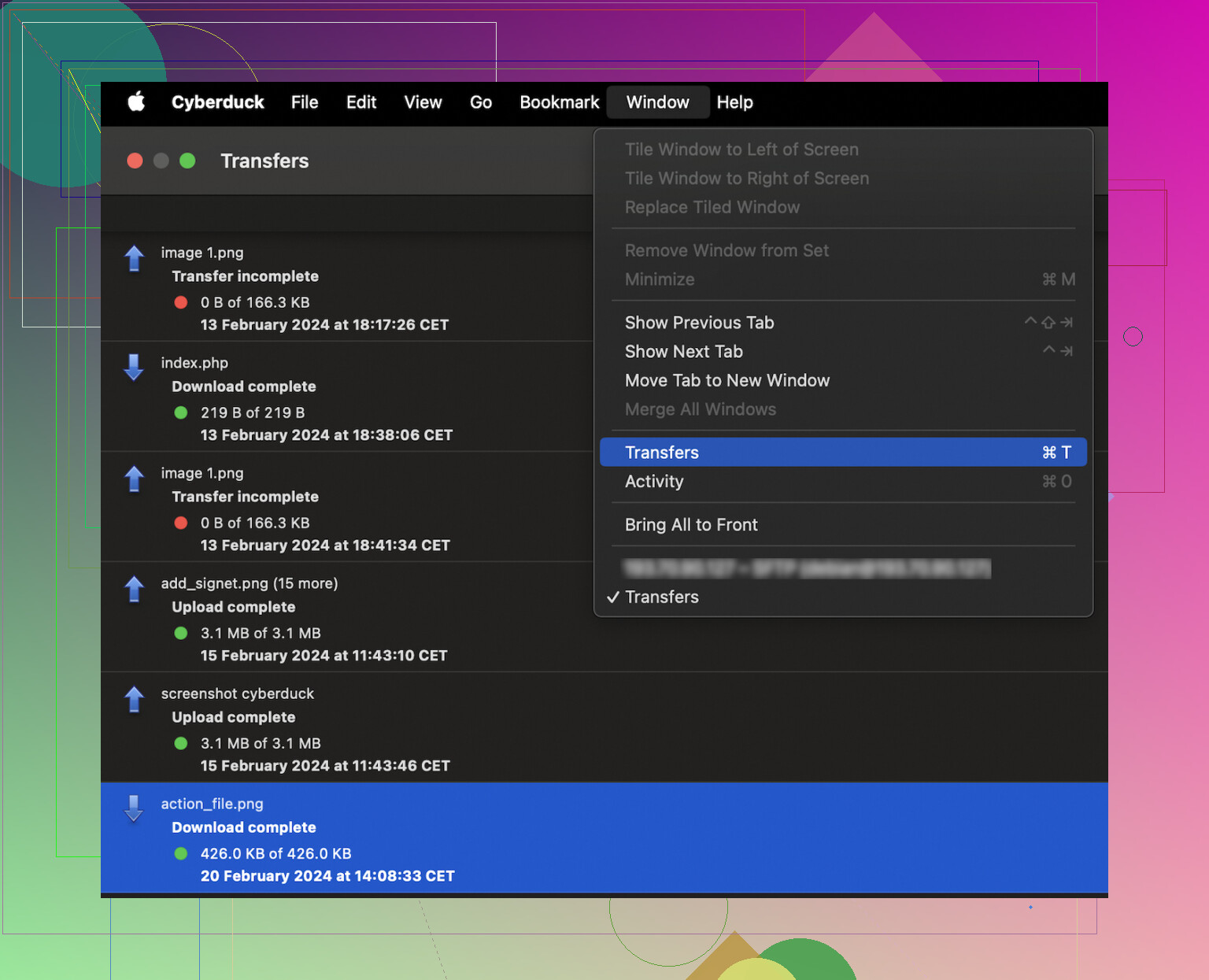
One issue frequently mentioned by users involves performance stability. The application can sometimes become slow or temporarily freeze, particularly when handling large directories or transferring many files simultaneously. During these moments, the interface may stop responding while the transfer queue processes tasks.
These delays can affect productivity in situations where large batches of files need to be uploaded or downloaded. Developers managing website deployments or administrators handling bulk server updates may notice the slowdown most clearly. When file transfers stall or the interface becomes unresponsive, tasks that normally take minutes can stretch longer than expected.
The issue does not occur consistently for every user, but when it appears, it can interrupt workflow and create uncertainty about whether transfers are still active.
Another limitation involves the single-pane navigation structure. Some users prefer dual-pane interfaces commonly found in other file transfer tools, which allow local and remote directories to be viewed side by side more easily.
Additionally, while Cyberduck supports many protocols, its interface can feel somewhat minimal compared to more advanced file management tools that include deeper automation or scripting options.
 Alternative: Commander One
For users who encounter performance issues or prefer a different workflow style, Commander One is sometimes considered as an alternative.
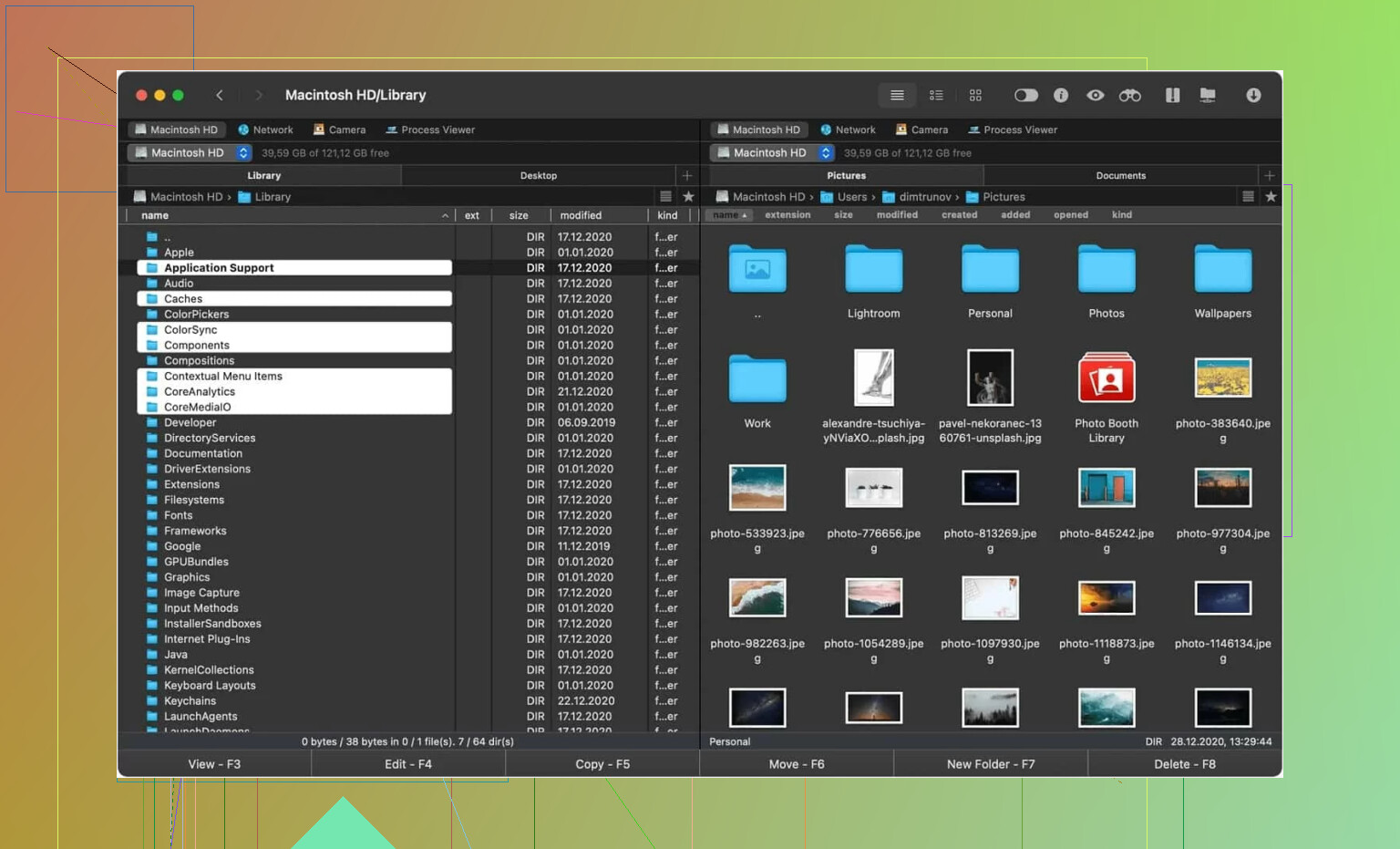
Commander One is a Mac-focused file manager and FTP client designed to simplify file transfers and folder management. The software includes a dual-pane interface, allowing users to view two directories simultaneously and move files between them with clearer visual context.
Another feature is the presence of configurable hotkeys, which allow commands and actions to be customized for faster navigation and file operations.
Users often report more stable performance during large transfers compared with the freezing behavior occasionally experienced in Cyberduck. Because the software is designed specifically for macOS, its interface and functionality are closely aligned with the operating system.
Commander One is not necessarily a universal replacement for Cyberduck, but it addresses several of the workflow and stability issues that some users encounter.
 Final Thoughts
Cyberduck provides a straightforward way to manage remote servers and cloud storage from a desktop environment. The software handles multiple protocols, integrates with several cloud platforms, and includes practical tools such as drag-and-drop transfers, bookmarks, and batch renaming.
For users who require a simple interface to move files between local systems and remote storage, the application can serve as a reliable everyday tool. Its open-source development and wide protocol compatibility also contribute to its continued use across development and hosting workflows.
However, occasional performance slowdowns and interface freezes can affect productivity during heavy file transfer sessions. Users who frequently manage large file sets may notice these limitations more clearly.
Despite these drawbacks, Cyberduck remains a practical option for connecting to servers and cloud storage, particularly for users who value its wide protocol support and straightforward approach to remote file management.
2 Likes
I’d use Cyberduck if your work is light to medium, and you want one app for FTP, SFTP, WebDAV, and cloud buckets without fiddling around. It is stable enough for a lot of people. The bookmark system saves time. Credential storage is clean. For simple uploads, edits, and remote cleanup, it does the job.
I disagree a bit with @mikeappsreviewer on one point. The plain interface is not always a plus. If you sync folders a lot, the single-pane view gets old fast. You spend more time checking where you are. Ths is where mistakes happen.
For reliability, Cyberduck is decent, not flawless. If your issue is connection drops, test it with your exact server first. Some FTP and SFTP problems come from timeout settings, passive mode, or SSH key setup, not the app itself. Cyberduck won’t fix a bad server config.
If you move large batches often, I’d look at Commander One first, espeically on Mac. Dual-pane is faster for file comparisons and repeated transfers. It feels more natural for sync-heavy work.
My short take:
Cyberduck for simple mixed cloud and server access.
Commander One for heavier transfer work and better file movement flow.
I’d split this by what kind of pain you’re trying to solve.
If you want one client that can talk to FTP/SFTP/WebDAV plus cloud storage without feeling bloated, Cyberduck is still a legit pick. I actually think @mikeappsreviewer is a little too forgiving about the simplicity though. Simple is nice until you’re doing repetitive compare-and-move work, then the single-window workflow starts feeling like extra clicks for no reason.
Where Cyberduck makes sense:
- jumping between different servers and cloud accounts
- occasional uploads/downloads
- basic remote file cleanup
- people who want a cleaner app and not a control panel from 2009
Where I’d hesitate:
- huge directories
- lots of sync-style work
- situations where you need to visually compare local vs remote fast
- if your current issue is specifically file sync reliability
Also, minor disagreement with @himmelsjager too: I wouldn’t call Cyberduck “decent, not flawless” for sync use, because sync isn’t really where it shines in the first place. It’s more of a transfer/browser tool than a true sync-first app. That distinction matters.
If you’re on Mac and your workflow is heavy, Commander One is probly the better fit. Dual-pane alone makes it easier to avoid dumb mistakes, and for repeated transfers it just feels more natural. If you’re searching stuff like “best Cyberduck alternative for Mac” or “Commander One vs Cyberduck for FTP,” that’s the comparison I’d look at first.
Short version:
- Cyberduck = good general-purpose transfer client
- Commander One = better if your day is lots of file movement and folder matching
So yes, Cyberduck is worth using, but not automatically the best answer to connection and file sync issues. Test it with your server setup first, becuase sometimes the client gets blamed for a server-side mess.
I’m a little less sold on Cyberduck as a fix for your specific problem than @himmelsjager, @espritlibre, and @mikeappsreviewer sound. Not because it’s bad, but because connection issues and file sync issues are two different headaches.
Cyberduck pros:
- broad protocol and cloud support
- clean bookmark handling
- good for occasional transfers
- simple UI if you hate clutter
Cyberduck cons:
- single-pane gets annoying fast
- not really a sync-first tool
- can feel sluggish with big folders or long queues
- less ideal for compare-and-move workflows
If your current client mainly fails on basic connections, Cyberduck is worth testing. If your pain is repeated folder syncing, I would not treat Cyberduck as the answer. It’s more browser/transfer tool than serious sync workspace.
That’s where Commander One makes more sense, especially on Mac.
Commander One pros:
- dual-pane layout
- easier local vs remote comparison
- faster feeling for repetitive transfers
- better flow for bulk file movement
Commander One cons:
- less minimal than Cyberduck
- may feel like overkill for light use
- some features matter more to power users than casual users
So my take is simple: Cyberduck is worth using for light to medium transfer work. For heavy file movement, frequent sync-like tasks, or fewer navigation mistakes, Commander One is probably the better fit. Test both with your actual server before blaming the client.