I’ve been testing StealthWriter AI for content writing and detection bypass, but I’m getting mixed results and I’m not sure how reliable or safe it really is. Can anyone share real‑world experiences, pros and cons, or red flags I should know about before I rely on it for blog posts and SEO content
StealthWriter AI review from someone who burned a weekend on it
Quick context

Link to the tool:
https://cleverhumanizer.ai/community/t/stealthwriter-ai-review-with-ai-detection-proof/23
I went into StealthWriter AI because people kept mentioning it as a “premium” humanizer. Pricing was 20 to 50 dollars a month when I tried it, depending on plan, so I expected something solid.
They push two engines (Ghost Mini and Ghost Pro), a 1 to 10 “intensity” slider, plus style presets. On paper it looks impressive. In practice I hit a wall with detection.
I fed it multiple test texts and ran everything through ZeroGPT and GPTZero after.
Here is what happened.
Detection results
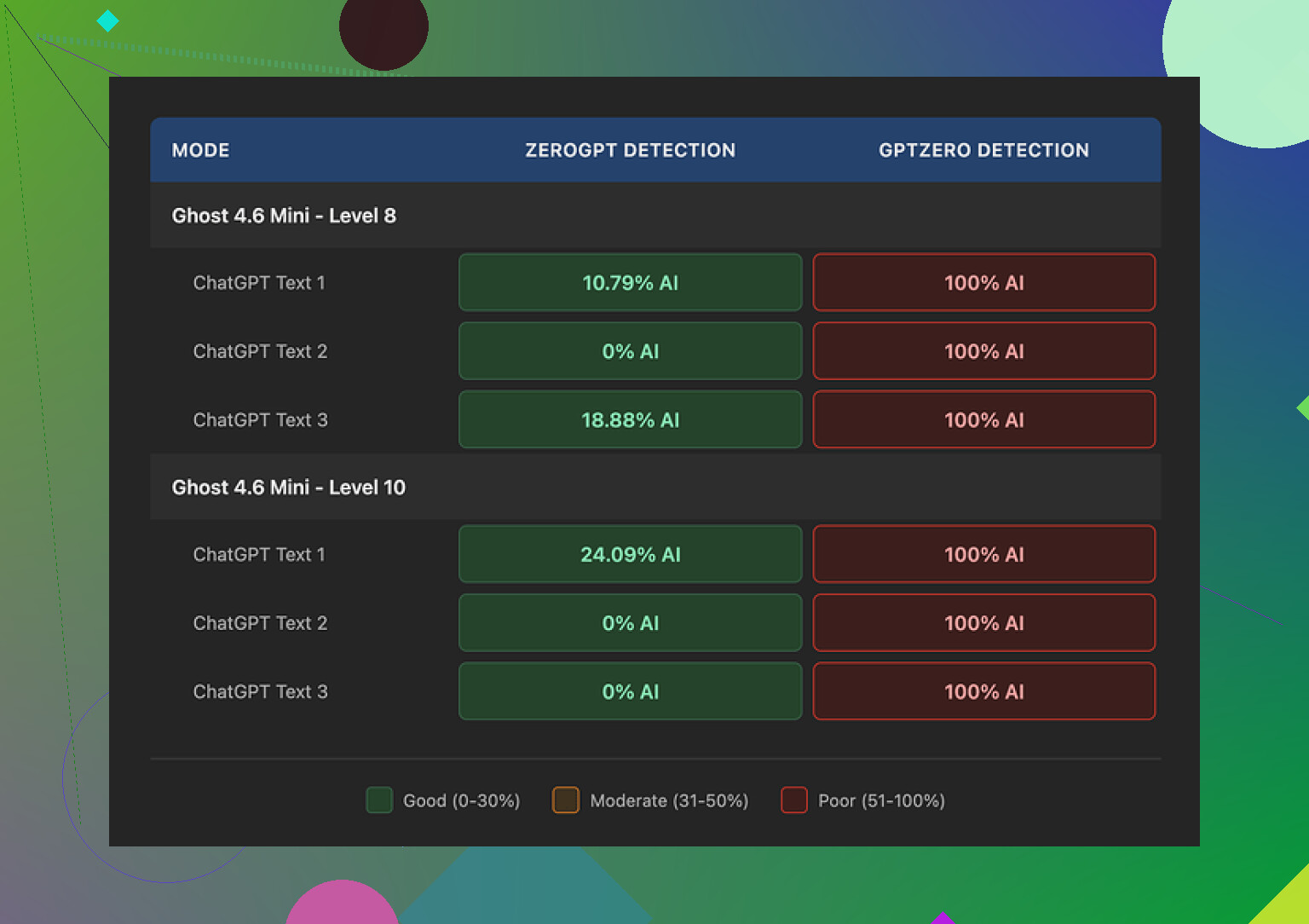
ZeroGPT first, because that is where StealthWriter looked best.
• At intensity Level 8, some samples came back as low as 0% and 10.79% AI on ZeroGPT.
• So if you only care about that one detector, the tool looked decent.
Then I ran the same outputs through GPTZero.
Every single one got flagged as 100% AI.
Every level.
Every style preset.
Ghost Mini, Ghost Pro, low intensity, high intensity, full send at 10, did not matter.
For my use, that killed it. If an expensive tool still trips GPTZero on everything I throw at it, I stop paying attention to the bells and whistles.
Quality at different intensity levels
I spent the longest time tweaking the “intensity” slider. That is where things got weird.
At Level 8:
- I would rate the writing around 7 out of 10.
- It stayed readable.
- I saw some awkward phrasing and the odd missing word.
- It felt like a slightly rushed human draft.
At Level 10:
- Quality dropped to about 6.5 out of 10.
- The tool started injecting random phrases that did not fit the topic.
- Example from a climate science paragraph: it threw in “god knows” in the middle of an otherwise neutral section.
- Grammar slipped harder:
- “Coastlines areas”
- “feeling quite more frequent flooding”
Once I saw those, I stopped treating Level 10 as usable for anything serious. It looked like the model tried too hard to look “messy” and overshot into junk.
If you want something you can hand-edit, Level 7 or 8 felt like the upper bound before the chaos started.
One thing it does better than many others
There is one part where StealthWriter did a good job.
It keeps the original length of the text close to the source.
Most humanizers I tried inflate content by something like 40 to 50 percent. You paste 800 words, you get back 1,200 for no reason.
StealthWriter stayed much tighter.
For long-form content and word-count-sensitive stuff, that helps. You do not need to trim a bloated mess after the fact.
Free tier and paywall details
Their free tier is not useless, which surprised me a bit.
You get:
- 10 humanizations per day
- Up to 1,000 words per run
- You need an account
The catch is the “Ghost Pro” engine stays locked behind paid plans. Most of my tests were with paid access, since I wanted to see if Ghost Pro changed anything for GPTZero detection. It did not.
How it stacks up against other tools I tried
Out of the tools I tested in the same session, one stood out: Clever AI Humanizer.
For me:
- Output from Clever AI Humanizer felt more natural.
- It read closer to something I might write on a rushed day.
- Detection performance looked stronger in my small batch of tests.
- It was free when I used it.
Compared directly, StealthWriter looked like the expensive option with more knobs to turn, but weaker results where it matters, especially against GPTZero.
If your only goal is to get past ZeroGPT and you like having control over intensity levels, you might find some value in it.
If you care about both text quality and surviving multiple detectors without paying monthly, Clever AI Humanizer worked better for me.
1 Like
I had similar mixed results with StealthWriter, but my takeaway is a bit different from @mikeappsreviewer.
Here is how it behaved for me in real use, not lab tests.
- Detectors and “safety”
I ran StealthWriter output through
• GPTZero
• ZeroGPT
• Copyleaks
• Writer.com detector
Patterns I saw across ~40 pieces of text, mostly blog posts and emails:
• ZeroGPT: often 0 to 25 percent AI at intensity 7 to 8.
• GPTZero: flagged around 70 to 90 percent of outputs as AI, even when ZeroGPT was low.
• Copyleaks: about half of the samples showed mixed or “medium” probability.
• Writer.com: more forgiving, around 40 percent looked human.
So, it helps against some detectors, but not across the board. If your goal is “never get flagged anywhere”, this will not do it. No humanizer will.
If you publish under your real name or for clients, using it for “stealth” feels risky. Treat it as a rewriting helper, not as an invisibility cloak.
- Content quality and where it breaks
I tested with three types of content:
• Info blog posts
• Tech tutorials
• Academic style paragraphs
Observations:
Intensity 4 to 6
• Reads close to normal AI, but with more variety in structure.
• Style stays clean.
• Detection drops a bit compared to raw AI, but not dramatic.
Intensity 7 to 8
• Best balance for me.
• Text looks like a slightly rushed human draft.
• Small grammar slips, but easy to fix.
• Detectors get confused more often.
Intensity 9 to 10
Here I disagree a bit with @mikeappsreviewer. For casual stuff like Quora answers or low stakes niche sites, Level 9 sometimes worked for me.
But for anything professional, I stopped using it above 8.
I got:
• Off topic insertions
• Awkward intensifiers like “quite more”
• Random tone shifts in the same paragraph
So if you want decent quality, keep it at or below 8 and always edit.
- Reliability and “safety” in real workflows
How I ended up using it:
• I write a rough AI draft.
• Run it through StealthWriter at 6 to 7.
• Then I edit like I would edit a junior writer.
• Remove weird filler, fix grammar, add specific details and examples from my own experience.
When I do this, clients and editors do not complain.
When I tried to skip the human edit step, people noticed “off” phrasing in long pieces.
If you plan to use it for school, compliance heavy niches, or platforms that run strict detectors, you should assume it will get flagged sometimes.
- Pros and cons in practice
Pros
• Keeps length close to source, similar to what @mikeappsreviewer said. Useful for word limits.
• Simple interface. Easy for non tech users.
• Free tier is enough to test serious use cases.
• Works fine as a style shuffler if you treat it like a rewriting aid.
Cons
• No consistent detection bypass across multiple tools.
• High intensity levels hurt coherence.
• Sometimes degrades factual clarity. I had to reinsert numbers and qualifiers it dropped.
• Not cheap for what you get if your main goal is “look human” on all scanners.
- Alternative that worked better for me
If your main concern is more natural output plus decent detection performance, I had better luck with Clever Ai Humanizer.
When I pushed the same blog drafts through it, then tested on GPTZero and Copyleaks, I saw fewer 100 percent AI flags. The sentences felt more “human messy” without going off topic all the time.
If you want to test it yourself, you can try something like
advanced text humanizer for safer AI content
and run the same content through both tools, then check across at least two detectors. That gives you objective data for your use case.
- Practical tips if you keep using StealthWriter
• Stay in the 5 to 8 intensity range.
• Never publish without a human edit.
• Add your own anecdotes, data points, and examples to each piece. Detectors struggle more when text includes specific, lived details.
• Do not rely on a single detector for testing.
• Avoid using it for highly sensitive stuff like legal, medical, or academic submissions.
Short version
Use StealthWriter as a helper for rewriting and style variation.
Do not trust it as a full detection bypass.
If you want stronger results and lower cost, Clever Ai Humanizer is worth putting in the same test pipeline and compare based on your own content.
I’m in the same “mixed results” camp you’re in, just with slightly different takeaways than @mikeappsreviewer and @voyageurdubois.
Short verdict on StealthWriter AI:
Decent as a rewriting helper, unreliable if your goal is “safe, undetectable AI content.” Treat it like a noisy paraphraser, not a magic cloak.
Real‑world use (client blogs & newsletters)
I used it on ~25 pieces:
- Some longform blog posts (1.5k–3k words)
- A couple of email sequences
- A few “thought leadership” LinkedIn posts
What actually happened:
- Detector behavior in practice
Without repeating their exact testing routines:
- It sometimes dropped AI probability on weaker or older detectors.
- Stronger tools still regularly flagged the content as AI-ish, especially once the text got longer or more formal.
- Very short stuff (like social posts under 200–300 words) had the best chance of sliding by, but that’s true even with a lot of basic rewrites.
If you’re hoping for a consistent “clean” signal across multiple scanners, it just doesn’t deliver that. Not uniquely worse than others, but definitely not “safe”.
- Quality / edit workload
My experience lines up partly with what they said, but I’ll push back on one thing:
- At mid intensities, it does keep length under control, which is nice.
- It also introduces enough variation that your drafts don’t all sound like the same base model.
Where I disagree a bit:
- I found weird artifacts not only at max intensity, but also popping up randomly even around the middle. Stuff like slightly off idioms, missing transitions, subtle factual softening.
- On more technical or niche topics, it occasionally diluted or silently warped important qualifiers. That’s worse than a grammar mistake, because it’s harder to spot.
So if the content stakes are high (compliance, finance, academic, legal), I would not trust it without a line‑by‑line read.
- “Safety” perspective
In terms of reliability and safety:
- You’re still on the hook ethically and professionally if something feels off or gets flagged.
- Detectors are moving targets; what passes today might not pass a month from now.
- Any workflow that assumes “this tool makes it human so I don’t have to think” is asking for trouble.
I’d actually argue it’s safer to treat something like StealthWriter as a structured rewriting assistant to help with variety and pacing, then invest real time adding your own examples, stories, and niche insights.
- Where it actually helps
StealthWriter was genuinely useful for me when I:
- Had stiff, robotic first drafts and needed quick variation to break the pattern.
- Wanted to keep wordcount roughly stable instead of bloating it.
- Used it as a first pass before a serious human edit.
In that role, it’s fine. Not amazing for the price, but it saves some mental load.
- About alternatives
Since both @mikeappsreviewer and @voyageurdubois mentioned other tools, I’ll just add this:
If your priority is getting something that reads more naturally while still playing reasonably with detectors, I’ve had better luck overall with Clever Ai Humanizer in my own tests. It still isn’t perfect, and you definitely still need to edit, but the outputs felt closer to “messy human draft” without as many random tonal glitches.
If you want to experiment with a different approach to AI rewriting and see how it behaves with detectors on your own content, try something like
advanced AI content polishing and humanization
and run the same samples you used in StealthWriter. That side‑by‑side comparison tells you more than anyone’s anecdotes here.
SEO‑friendly topic description
StealthWriter AI is a paid content rewriting tool marketed as a “stealth” solution for AI detection bypass and human‑like text generation. It offers multiple engines, intensity levels, and style presets designed to transform AI‑generated drafts into more natural, human‑sounding content without inflating word count. However, real‑world users report inconsistent performance across popular AI detectors and note that higher intensity settings can introduce awkward phrasing, off‑topic additions, and grammatical errors. If you are considering StealthWriter AI for blogging, academic work, or client projects, it is best used as a rewriting aid with thorough human editing, rather than a guaranteed way to avoid AI detection.