I’m looking for a real UnAIMyText review because I tried using it to make my writing sound more natural, but the results still felt awkward and easy to spot as AI. I need help figuring out whether I used it wrong, if the tool actually works, or if there’s a better option for humanizing AI text.
UnAIMyText AI Review
I tried UnAIMyText because the pitch looked absurdly good. Free. No cap on usage. No account. Up to 1,000 words each time. I figured there had to be a catch. After testing it, yeah, there was.
My short version, it failed hard.
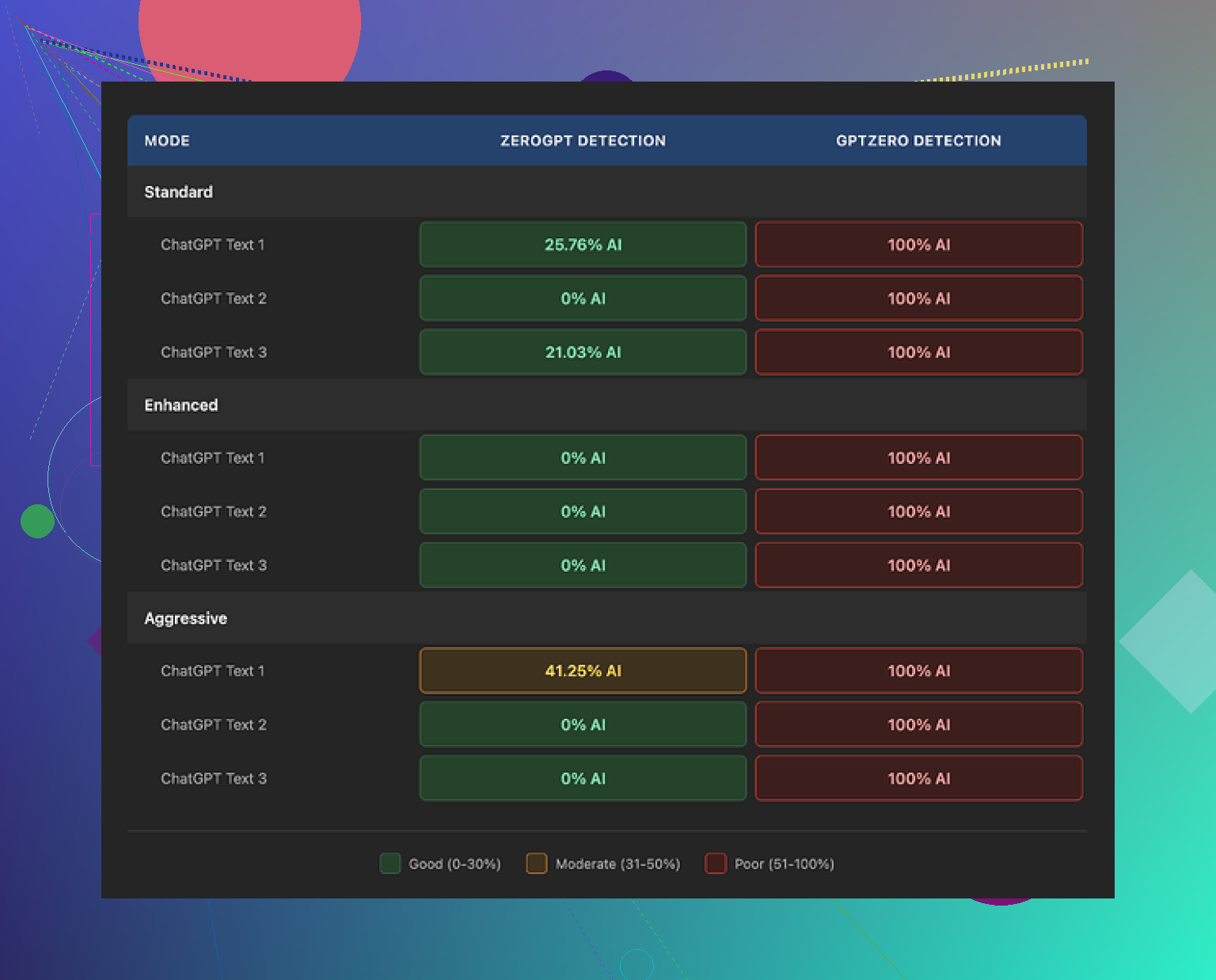
I ran outputs from all three settings, Standard, Enhanced, and Aggressive, through GPTZero. Every single one came back at 100% AI. So if your goal is to get text past detection, this one did nothing for me.
The detection score was bad, but the writing was worse. Standard mode felt clumsy and weirdly stitched together. I got made-up terms like “anticipatable” and “architectured,” which read like somebody forced a thesaurus through a blender. I gave it 4/10 only because parts of it still looked like English.
Enhanced mode dropped lower for me, around 3/10. This was where the output started drifting into nonsense. One line described melting ice as “the dramatic leaving of the glaciers.” Another sentence looked grammatical at first glance, then collapsed when I read it twice. It had the shape of writing, not the function.
Aggressive mode did not save it. Same mess, different setting. In one cybersecurity sample, it randomly brought up “robots” for no reason. In a climate-related test, it called a solution “one of the good plays.” It read like machine text trying too hard to sound loose and human, then tripping over itself.
One thing annoyed me more than I expected. It bloats text. A lot. I fed it around 200 words and kept getting back 300-plus. So you are not getting cleaner writing. You are getting padded writing. If you care about keeping your draft tight, this gets old fast.
After a few runs, I stopped seeing any meaningful difference between the three modes. The labels imply a real shift in method, but the outputs felt like the same engine doing random synonym swaps with minor variation. I did not see a clear use case for choosing one over another.
I also checked the privacy terms out of habit. Odd detail, they mention account deletion steps even though the tool does not use accounts. I can't prove anything from that alone, but it looked sloppy. Maybe a pasted template. Maybe they forgot to edit it. Either way, it did not help trust.
If you want my practical take, test your own sample before relying on it for anything important. Use a short paragraph from your real workflow, then check three things, detector score, readability, and word count inflation. On my side, UnAIMyText lost on all three.
I compared it against a few other options and had a better result with https://cleverhumanizer.ai. It performed better in my tests and I was able to use it freely without running into the same mess.
I don’t think you used UnAIMyText wrong. I think the tool is hit or miss, and for a lot of drafts, mostly miss.
My take is a little different from @mikeappsreviewer on one point. I did see small changes between modes. The problem was the changes were not useful. One version swapped words. Another stretched the paragraph. Another made the tone loose in a weird way. None fixed the core issue, which was rhythm. Human writing has uneven sentence flow, specific word choice, and clear intent. UnAIMyText kept flattening all three.
That awkward feel you noticed is the main red flag. Detector scores matter less than read quality. If a sentence sounds off when you read it out loud, people spot it fast. I tested it on emails, blog text, and a short product explainer. Best case, it made the text bland. Worst case, it made it clunky and kinda fake.
A quick way to check if the tool is hurting your draft:
- Compare word count before and after.
- Read it out loud once.
- Highlight any phrase you would never say.
- Check if it changed meaning.
- Run one detector, not five.
If you want more natural output, start with cleaner input. Shorter sentences. Fewer filler phrases. Then do a manual pass yourself. If you want a tool, Clever Ai Humanizer gave me smoother text with less cleanup. Not perfect, but less awkard.
So no, I don’t think you messed it up. The tool likely did.
I don’t think you used UnAIMyText wrong. I think you hit the actual limit of the tool.
Where I slightly disagree with @mikeappsreviewer and @suenodelbosque is on the detector part being the main signal. Detectors are flaky anyway. For me, the bigger issue is that UnAIMyText often rewrites with the wrong kind of “human.” It adds randomness, but not voice. That’s why it still feels easy to spot. Real human writing usually has intention, not just variation.
What I noticed in my own tests:
- it over-explains simple lines
- it swaps in odd wording that no normal person would pick
- it sometimes weakens the original point
- the text comes back sounding “processed”
That last part is hard to measure, but you can feel it imediately.
Also, some tools do better when the source text already has personality. If your draft is very generic AI copy, UnAIMyText seems to just remix the blandness instead of fixing it. So yeah, input matters a bit, but not enough to excuse awkard output.
If your goal is natural-sounding text, I’d skip relying on it as a final pass. Use it only for rough variation, then rewrite manually. If you want an actual alternative, Clever Ai Humanizer gave me cleaner output with less weird synonym stuffing. Not magic, just more usable.
So my review: not a scam exactly, just not very good at the one job people want from it.